Eight settings decide how OneLeg trades: Point, Lot, MinLevelOpen, AutoShift, SignalMode, order type, FixTP and FixSL. This page explains each one with a real XAUUSD (gold) set and walks through one trade made with it, from the gap signal to the close, using the chart, the strategy log and the terminal. Use it as a worked example, not as ready-made levels: the right values depend on your broker, its spread and its execution. All other settings are described in the OneLeg settings reference.
The 8 key OneLeg settings and what they control
| Setting | What it controls | XAUUSD example | How to choose it |
|---|---|---|---|
| Point | Price step of the symbol. Every setting in points (pt) is counted in this step. | 0.01 | Use the symbol’s price step: for XAUUSD at 4062.22, one point is 0.01 USD. |
| Lot | Fixed volume of each trade on the slow broker. | 0.3 | Start with the minimum lot and raise it only after the log shows stable fills. |
| MinLevelOpen | Main entry threshold. A trade opens when the gap reaches MinLevelOpen + slow spread + Commission. | 50 pt | Set it above the usual noise of the gap chart, so only sharp moves of the fast feed trigger trades. |
| AutoShift | Removes a constant price offset between the fast feed and the broker. The gap is the current difference minus its moving average over the set number of ticks. | On, 100 ticks | Keep it on when the two quotes differ by a steady amount, as is common on gold. |
| SignalMode | Gap formula. Mode 1 measures the Buy gap to the broker’s Ask and the Sell gap to the broker’s Bid, the prices you can actually trade at. | 1 | Mode 1 is the more realistic choice for most brokers. |
| Order type | How the opening order is sent and filled. | Market FOK | FOK (fill or kill) fills the whole volume or nothing. Use a filling mode your broker supports. |
| FixTP | Virtual take profit: FixTP + Commission. | 30 pt | Large enough to cover the slippage you see in the log, small enough to be reached while the broker catches up with the fast feed. |
| FixSL | Virtual stop loss: FixSL + slow spread. | 50 pt | Limits the loss when the broker’s price does not follow the fast feed. |
In this set Commission is 0, so it adds nothing to the entry threshold or to FixTP. If your broker charges commission, enter it in points so that the thresholds cover it.
Example OneLeg set for XAUUSD
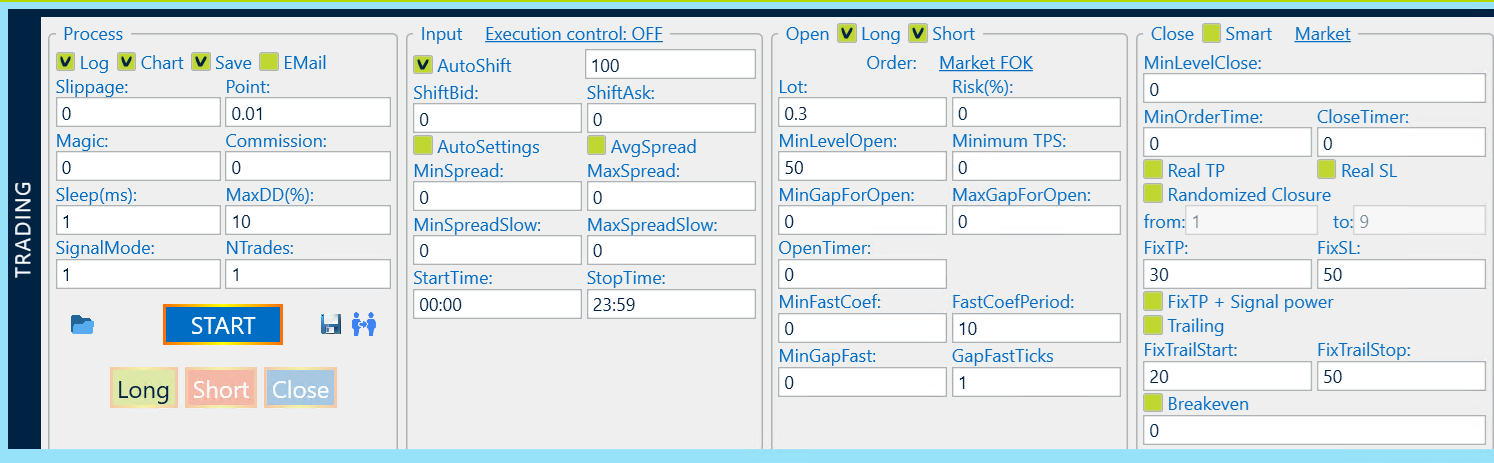
Settings not listed below are 0 or off. You can download the example set (.preset) and load it with the Load set button to study it; adjust the levels to your broker before trading.
- Process panel: Point 0.01, Slippage 0, Magic 0, Commission 0, Sleep 1 ms, MaxDD 10%, SignalMode 1, NTrades 1, Log on, Chart on, Save on.
- Input panel: AutoShift on with 100 ticks, ShiftBid and ShiftAsk 0, AutoSettings off, AvgSpread off, spread filters 0 (off), trading hours 00:00 to 23:59.
- Open panel: Long and Short allowed, order Market FOK, Lot 0.3, Risk 0, MinLevelOpen 50, Minimum TPS 0, OpenTimer 0, FastCoefPeriod 10, GapFastTicks 1.
- Close panel: Market close, MinLevelClose 0, MinOrderTime 0, CloseTimer 0, FixTP 30, FixSL 50, Real TP and Real SL off, Trailing off (FixTrailStart 20, FixTrailStop 50), Breakeven off.
Worked example: one XAUUSD Sell trade, step by step
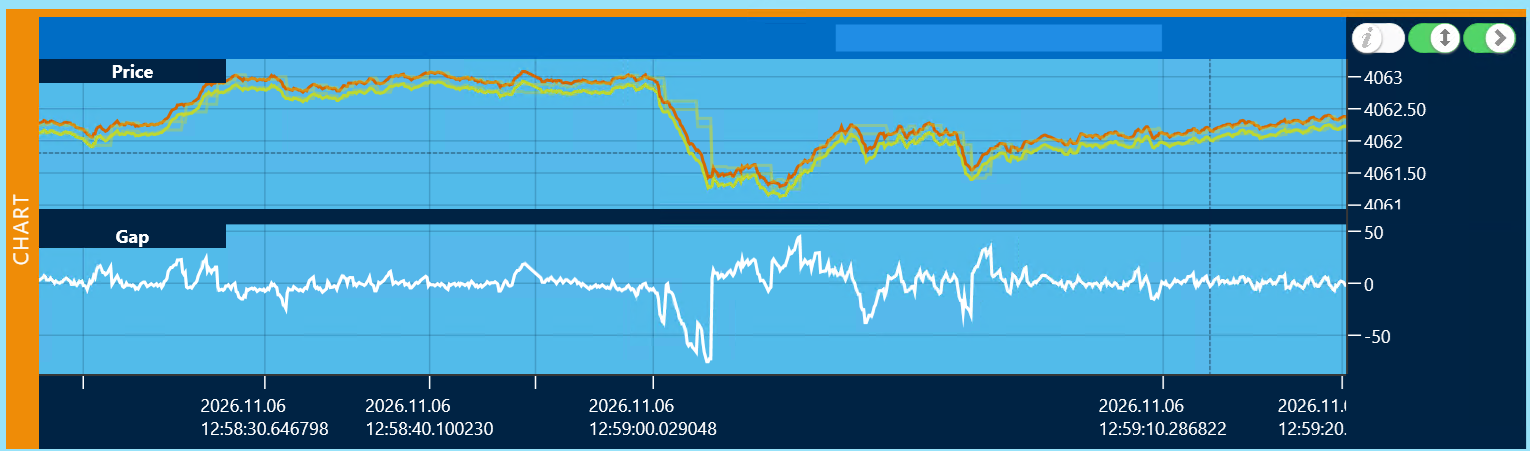
- The fast feed moves first. Until 12:59:00 the gap stays between about −20 and +20 points. Then the fast price falls sharply while the broker’s price lags behind, and the gap drops to about −70 points.
- The Sell signal fires. At 12:59:00.328 the gap passes the entry threshold (MinLevelOpen 50 + slow spread + Commission 0) on the negative side: the broker’s price is too high compared with the fast feed. OneLeg sends a Sell of 0.3 lot at the broker’s price of 4062.49.
- The order is filled with slippage. 11.5 ms later the broker confirms the Sell at 4062.22. The gap at that moment is −66.45 points. The fill is 27 points worse than the requested 4062.49, which the log shows as Slippage −27.0.
- The take profit is reached. The virtual take profit is FixTP 30 + Commission 0 = 30 points. The broker’s price keeps falling after the fast feed, and at 12:59:00.435 the close signal fires at 4061.47 with the reason TP.
- The position is closed. The closing order is filled 28 ms later at 4061.60, 13 points worse than requested (Slippage −13.0). The gap is now +5.19: the two prices have met again. The trade lasted about 0.12 seconds.
- The result. 4062.22 − 4061.60 = 0.62 USD, or 62 points on 0.3 lot. The terminal shows a profit of 13.89 in the account currency; the value of one point depends on the broker’s contract size and any commission.
The same trade in the OneLeg log

| Time (UTC) | Log line | What it means |
|---|---|---|
| 12:55:52–12:55:53 | OneLeg.00 started, Connected fast feed, logged in OK | The strategy started, connected to the fast feed and logged in to the broker. |
| 12:59:00.328 | SELL XAUUSD 0.30 signal received at 4062.49 | The gap crossed the entry threshold; the Sell is sent at the broker’s current price. |
| 12:59:00.340 | SELL OK at 4062.22; Gap=−66.45; Slippage=−27.0; Execution=11.488 ms | The broker filled the order. Negative slippage means a worse price than requested. |
| 12:59:00.435 | Close time initialized … MinOrderTime=0 sec | No minimum holding time is set, so the position may close at once. |
| 12:59:00.435 | CLOSE XAUUSD 0.30 signal received at 4061.47 | The take profit condition is met. |
| 12:59:00.463 | CLOSE OK at 4061.60; Gap=5.19; Slippage=−13.0 by TP; Execution=28.035 ms | The position is closed by take profit, 13 points worse than requested. |
The same trade tick by tick (Save file)
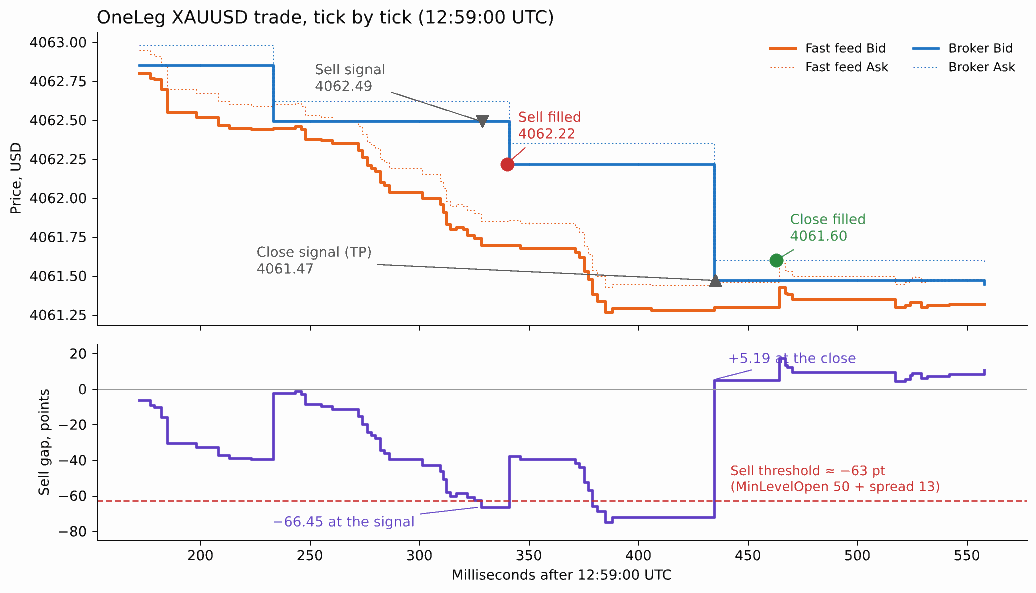
With Save on, OneLeg recorded 4,010 ticks of this session in a .1leg file. Read tick by tick, it shows what the log and the terminal cannot:
- The fast feed leads. From 12:59:00.18 the fast Bid falls step by step, while the broker’s Bid stays at 4062.85 and then 4062.49.
- The threshold is crossed on one tick. At 12:59:00.328 the Sell gap reaches −66.45, the same value as in the log. The tick before it was −62.27, so the Sell threshold lies at about −63 points: MinLevelOpen 50 + the broker’s spread of 13 points.
- Entry slippage is a broker repricing. 12 ms after the signal the broker’s quote moves from 4062.49 to 4062.22, the price of the fill. That move is the −27 points of entry slippage.
- The broker skips the take profit level. For about 95 ms the broker holds 4062.22 while the fast Bid falls to 4061.27 and the gap widens to −72. At 12:59:00.434 the broker jumps straight to 4061.47 / 4061.60, past the 30-point target.
- Exit slippage equals the spread. The close is a Buy. The signal shows the broker’s Bid (4061.47), and the order is filled at the broker’s Ask (4061.60), so the −13 points of exit slippage are the broker’s spread at that moment.
The same trade in the trading terminal

The terminal shows 14:59:00, while the chart and the log show 12:59:00. The log and chart use UTC, and the broker’s server time is UTC+2; the close line of the log shows both (CurrentTime 14:59, UtcNow 12:59). Match trades by minutes and seconds.
Where OneLeg saves logs and tick data
Two checkboxes in the Process panel write files to the program folder, by default C:\Program Files\Westernpips Private 7. Both are on in the example set.
| Checkbox | What is saved | Folder | Used for |
|---|---|---|---|
| Log | Two CSV files: db_*.log with gaps, levels, spread and TPS, and qu_*.log with every quote of both providers. |
C:\Program Files\Westernpips Private 7\.logs\<strategy name> |
Checking entries, exits and spreads in Excel. |
| Save | Every tick: fast and slow Bid/Ask, Buy and Sell gap and time, in a .1leg file. |
C:\Program Files\Westernpips Private 7\.data\<strategy name> |
A complete record of the session for your own analysis. See the tick-by-tick example and the file format below. |
Format of the .1leg tick file
The Analyzer in the current build of Westernpips Private 7 does not open .1leg files, but the format is simple to read with your own tools. The file is a sequence of 56-byte records, one per tick:
- Bytes 0–47: six 8-byte numbers (little-endian double): fast Bid, fast Ask, broker Bid, broker Ask, Buy gap, Sell gap. Gaps are in points.
- Bytes 48–55: time as an 8-byte .NET DateTime tick count (100-nanosecond steps from 1 January 0001), in UTC.
import struct, datetime
data = open("20261106125553.1leg", "rb").read()
for i in range(0, len(data), 56):
    fb, fa, sb, sa, buy_gap, sell_gap, t = struct.unpack_from("<6dq", data, i)
    time = datetime.datetime(1, 1, 1) + datetime.timedelta(microseconds=(t & 0x3FFFFFFFFFFFFFFF) // 10)
    print(time, fb, fa, sb, sa, buy_gap, sell_gap)
The on-screen strategy log is always shown, whether Log is on or off. To keep it, copy it with the C button; see how to read the OneLeg log.
What this example shows about the settings
- The entry level filters the noise. For most of the chart the gap stays within ±20 points. Only the sharp move to about −70 passed MinLevelOpen 50 plus the spread, so the strategy made one trade instead of many weak ones.
- Slippage is part of the result. The trade lost 27 points on entry and 13 on exit to slippage, 40 points in total, and still made 62. With a much smaller FixTP the same slippage would have turned the trade into a loss, so set FixTP from the slippage you see in your own log.
- Execution speed matters. The broker filled the entry in 11.5 ms and the exit in 28 ms, and the whole trade lasted about 0.12 seconds. With slower execution the broker’s price may already have moved before the fill.
- Target and stop are close in size. FixTP 30 against FixSL 50 + spread means a stop loss costs roughly as much as two winning trades. Check the share of winning trades in your log before raising the lot.
- One trade proves nothing. Judge a set on at least 20–50 trades on a demo account or with the minimum lot.
How to adapt the set to your broker
- Check Point and the filling mode. Confirm the symbol’s price step and that the broker accepts FOK orders; otherwise choose the mode it supports.
- Watch the gap chart without trading. Note the usual range of the gap and how far it moves on sharp price changes at your broker. OneLeg has no backtest, so this chart is the main tool for choosing the levels.
- Set MinLevelOpen from what you saw. Place it above the usual noise. Remember that the slow spread and your commission are added to it.
- Set FixTP and FixSL from your slippage. Turn on Log and Save, trade the minimum lot and read the Slippage and Execution values in the strategy log. Then adjust one setting at a time.
The full procedure is in OneLeg first setup, step by step.
Related guides
- OneLeg: before you start
- OneLeg first setup, step by step
- OneLeg troubleshooting
- Full OneLeg settings reference
Risk warning. Trading Forex, CFDs and cryptocurrencies with leverage carries a high risk of losing money. Results depend on the broker, its execution and rules, latency and settings; no profit is guaranteed. The example set and trade on this page illustrate how the settings work and are not a recommendation. Test on a demo account first. Read the full risk warning.