Slippage Control – Fast Guide
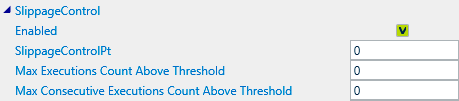
The Slippage Control module is an essential protection system for all latency arbitrage algorithms.
It monitors the price difference (slippage) between the signal price from the fast feed and the actual execution price on the slow broker.
If slippage exceeds safe limits repeatedly, the system automatically pauses trading — preventing losses, broker detection, and account flagging.
This module is especially important when brokers use dealing desk plugins, A/B filters, or execution delays designed to trap arbitrage traders.
⚙️ Settings Overview
| Setting | Type | Default | Description |
|---|---|---|---|
| Enabled | boolean | true | Enables the slippage monitoring and protection system. |
| SlippageControlPt | integer | 30 | Maximum allowed slippage per trade in points. |
| MaxExecutionCountAboveThreshold | integer | 10 | Total number of trades allowed to exceed the slippage limit during one session. |
| MaxConsecutiveExecutionsCountAboveThreshold | integer | 3 | Maximum number of consecutive trades with slippage above the limit before protection triggers. |
⚙️ 1. Enabled
What it does
Turns on or off the Slippage Control module.
When enabled, every executed trade is analyzed to detect excessive slippage compared to the signal feed.
Recommendation
✅ Always keep Enabled = true during live latency arbitrage trading.
Disabling this function removes your first level of protection against broker-side manipulation.
⚙️ 2. SlippageControlPt
Description
Defines the maximum slippage in points allowed between:
-
Fast price (signal) — from the data feed or fast broker
-
Slow price (execution) — the actual order fill price on your trading account
If the difference between these prices exceeds SlippageControlPt, the trade is considered unsafe and counted as a slippage violation.
Formula
If Slippage > SlippageControlPt → trade = violation.
Recommended Values
| Symbol Type | Recommended SlippageControlPt |
|---|---|
| Major FX Pairs (EURUSD, GBPUSD) | 20–30 pt (≈ 2–3 pips) |
| Gold (XAUUSD) | 50–100 pt (≈ 5–10 pips) |
| Indices (GER30, US30) | 100–300 pt |
| Crypto (BTCUSD) | 200–1000 pt (depending on volatility) |
Smaller slippage limits increase protection but may reduce trading frequency.
For latency arbitrage, balance between tight protection and signal reliability is key.
⚙️ 3. MaxExecutionCountAboveThreshold
What it does
Defines how many total trades are allowed to exceed the slippage limit within a session before trading is paused.
If too many trades slip beyond SlippageControlPt, the system assumes the broker has enabled delay filtering or re-quoting plugins and stops new entries.
Example
→ After 10 trades with slippage > 30 pt, the algorithm pauses trading to protect the account.
Recommendations
| Strategy Type | Suggested Value |
|---|---|
| HFT / FIX Arbitrage | 5–8 |
| Standard MT5 Arbitrage | 8–12 |
| Hybrid / Multi-feed Trading | 12–20 |
⚙️ 4. MaxConsecutiveExecutionsCountAboveThreshold
What it does
Specifies how many consecutive trades with excessive slippage can occur before the control system intervenes.
This protects against broker-side manipulation bursts, when several trades in a row are intentionally executed at worse prices to trigger your algorithm’s stop or to record you as an arbitrage trader.
Example
→ If 3 trades in a row exceed 40 pt slippage, the system halts trading.
Recommended Values
| Setup Type | Recommended Consecutive Trades |
|---|---|
| Ultra-fast VPS / FIX | 2 |
| Low-latency MT5 / cTrader | 3 |
| Standard VPS / Remote Setup | 4–5 |
⚙️ 5. How It Works Step-by-Step
-
Module Activated
Every trade compares the fast signal price vs. the actual fill price. -
Slippage Calculation
For each executed trade:Slippage = |ExecPrice – SignalPrice| / PointValue -
Threshold Comparison
-
If
Slippage ≤ SlippageControlPt→ trade accepted (normal). -
If
Slippage > SlippageControlPt→ violation detected.
-
-
Violation Counters
-
TotalViolations++ -
ConsecutiveViolations++
-
-
Protection Trigger
-
If
TotalViolations ≥ MaxExecutionCountAboveThreshold→ trading paused. -
If
ConsecutiveViolations ≥ MaxConsecutiveExecutionsCountAboveThreshold→ immediate pause.
-
-
Automatic Recovery
When stable, low-slippage executions resume, counters reset and trading continues automatically.
🧠 Why Slippage Control Is Critical for Latency Arbitrage
-
Detects broker manipulation early.
Identifies when brokers start delaying fills or sending off-market prices. -
Prevents broker-side plugin activation.
Frequent slippage spikes often trigger anti-arbitrage filters. This module reduces exposure before that happens. -
Protects profitability and account stability.
Avoids trades with unrealistic fills and keeps the account within “safe execution” parameters. -
Mimics human trading patterns.
By pausing after excessive slippage, your trades appear more “human-like” and less detectable by A/B systems.
⚠️ 6. Typical Mistakes & Fixes
| Mistake | Result | Fix |
|---|---|---|
| SlippageControlPt too low | Frequent pauses, missed opportunities | Increase to 20–40 pt |
| Too high slippage limit | Broker delay not detected early | Keep within 20–50 pt for FX |
| Disabled module | No slippage protection, risk of detection | Always keep Enabled = true |
| Large consecutive limit (>5) | Broker plugin activates before system reacts | Reduce to 2–3 |
| Incorrect point conversion | Wrong thresholds | Always calculate in points (not pips or USD) |
✅ Summary
| Setting | Purpose | Recommended Range |
|---|---|---|
| Enabled | Activates slippage protection | True |
| SlippageControlPt | Max allowed slippage in points | 20–50 (FX), 50–100 (Gold) |
| MaxExecutionCountAboveThreshold | Total allowed violations per session | 5–10 |
| MaxConsecutiveExecutionsCountAboveThreshold | Consecutive violations allowed | 2–3 |
🧭 Final Notes for Arbitrage Traders
-
Always use low-latency VPS with ping < 2 ms to the broker server.
-
Combine Slippage Control with Execution Control and Session Control for full protection.
-
This module helps avoid broker detection and ensures stable, stealthy, and consistent execution.
-
If you notice frequent triggers — your broker is likely applying a delay filter or plugin.
Consider switching to a faster or less restrictive liquidity provider.