Westernpips DocsWesternpips Docs
  • Home
  • FAQ
  • Documentation
  • Forums
  • Home
  • FAQ
  • Documentation
  • Forums
  • Crypto Trader
    • Crypto Scanner - 1 Leg
    • Crypto Scanner - 2 Leg
    • Crypto Table
  • Getting Started
    • Web Portal my.westernpips.com
      • Web Portal Password Recovery
      • How to Buy Westernpips Products?
    • Products Installation
    • Prerequisites
      • .NET Desktop Runtime Installation
      • ASP.NET Core Runtime Installation
      • Microsoft Redistributable Installation
    • System Requirements
    • Installation Troubleshooting
  • Westernpips Golden Tools 3.5.7
    • Downloading
    • First Run
    • Installing a Westernpips Products Using WGT
    • Working with Installed Products
    • WGT Update
  • Westernpips Private 7
    • How to Check Which Quote Feed Is Faster
    • Installing and First Run
    • License Activation and Login
    • Change License IP, Add new IP
    • User Interface
      • Main Window
      • Dashboard
        • Options
        • Strategies
        • Connections
        • Schedulers
    • Trades Discovery, Check Orders Duration
    • WESTERNPIPS PRIVATE 7 ALGOS
      • OneLeg
        • OneLeg: Before You Start
        • OneLeg First Setup, Step by Step
        • OneLeg Key Parameters with an XAUUSD Example
        • OneLeg Troubleshooting
      • Two Leg Simple Hedge
      • Two Leg Lock
      • Multi Leg Spread
      • One Leg Multi
      • OneLegHidden
      • Two Leg Standard
      • Remote
      • Copier
      • Clicker in WesternPips Private 7
      • Session Control — Quick Guide
      • Exucution Control — Quick Guide
      • Slippage Control - Fast Guide
      • Add/Edit Provider Window Settings
      • BackTester
      • Setting up a connection with the Broker Terminal via the EA connector
    • Connectors
      • Common Settings and Operation
        • FIX Connection Settings
        • FIX Logs
      • Trading and Fast Sources Connectors
        • 24Exchange Connector
        • Active Financial API Connector
        • Binance Connector
        • Bitfinex Connector
        • CBOE FIX Connector
        • Celer FIX Connector
        • CFH FIX Connector
        • CTrader FIX Connector
        • DukasCopy FIX Connector
        • DxFeed FIX Connector
        • Euronext FIX Connector
        • Exante FIX Connector
        • FastMatch ITCH Connector
        • FlexTrade FIX Connector
        • Fortex FIX Connector
        • FXCM FIX Connector
        • FxPig FIX Connector
        • GCEX FIX Connector
        • Gold-i Matrix FIX Connector
        • Integral FIX Connector
        • LMAX API Connector
        • LMAX FIX Connector
        • MaxxTrader FIX Connector
        • MT EA Connector
        • M4 Server Connector
        • M5 Server Connector
        • OGM FIX Connector
        • OKX Connector
        • OneZero FIX Connector
        • PrimeXM FIX Connector
        • Remote Connector
        • Rithmic Connector
        • RoE FIX Connector
        • Saxo FIX Connector
        • SolidFX FIX Connector
        • Spotex FIX Connector
        • TraderMade FIX Connector
        • Universal Connector
        • Universal Fast Connector
        • XenFin FIX Connector
        • XTRD FIX Connector
  • Westernpips Webcliker
    • System Requirements
    • Installer
    • Agent
    • UI Settings
    • UI Logs
    • Start/Stop
    • Connections
    • Trade platforms
      • CMC Markets
      • M5 Web
      • M4 Web
      • TRADE NATION
      • Exness Web
      • Universal cliker
      • IG Trading Platform
      • MEX / MultiBank
      • ByBit
      • EXANTE
      • IQ Option
      • Plus500
      • Quotex
    • Risk Warning
  • Glossary
    • Latency Arbitrage
    • Fast Price Feed
    • Execution Latency
    • Slippage
    • FIX API
    • Requote
    • Forex Arbitrage
    • Toxic Flow
    • Last Look
    • B-Book
    • Forex VPS
    • Brokers That Allow Arbitrage
    • Low Latency

Copier

776 views 3

    This strategy allows you to completely copy all transactions from one of your accounts to another account of this or another broker. Entries into a trade through this strategy will not be considered arbitrage and therefore brokers will not ban.
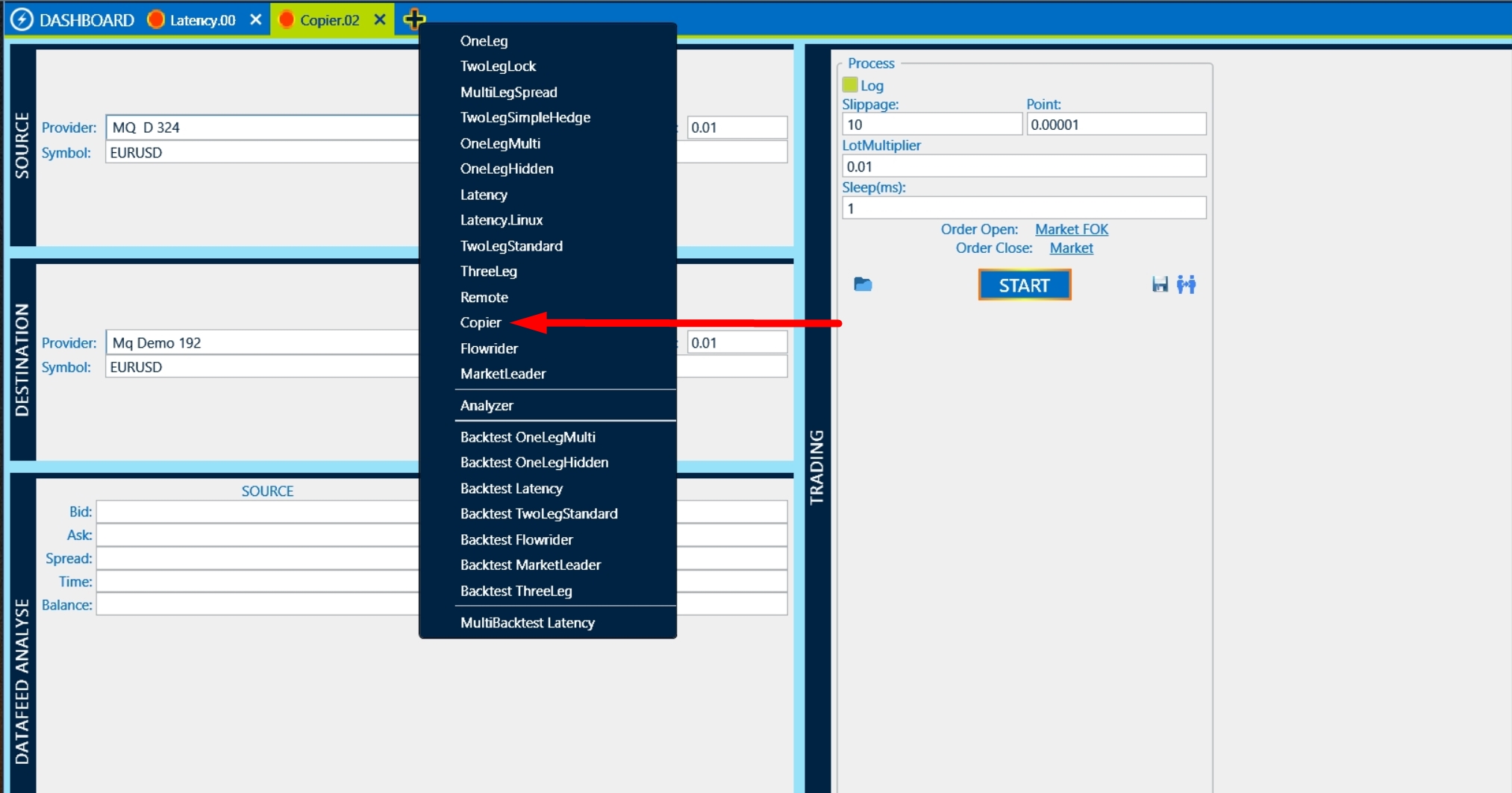
Copier - начало1 1

The setup is very simple. First, we specify the broker from which all transactions will be copied (SOURCE) and in (DESTINATION) we specify the broker in which all transactions will be duplicated.
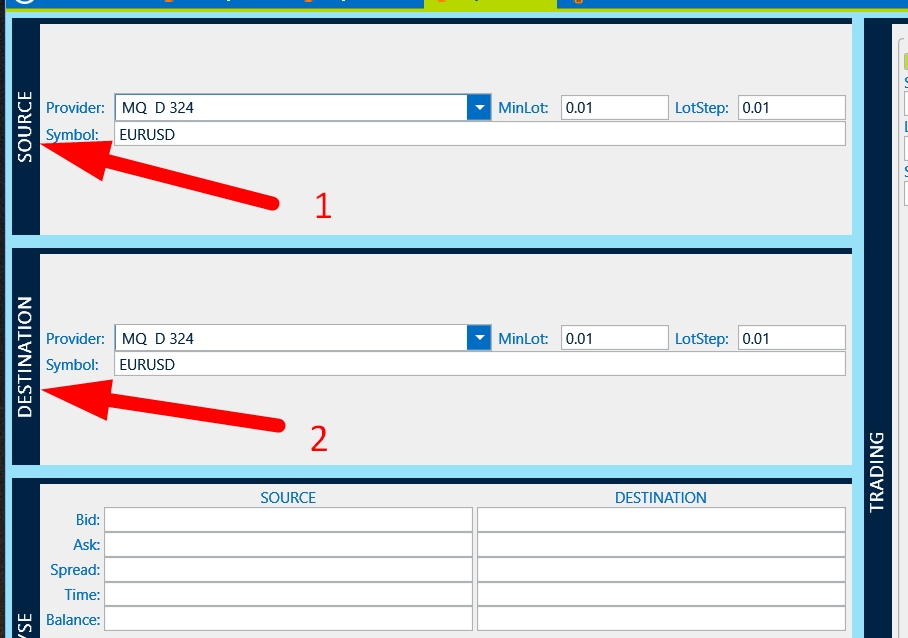
Copier - начало 2

Standard operating setting

Copier - начало 4

The setup of the copier is completed. Now you can check the trade. To do this, we configure the main account from which all transactions will be copied. Choose the strategy and setup you need on your main account. In our example, this is the 1 Leg strategy.
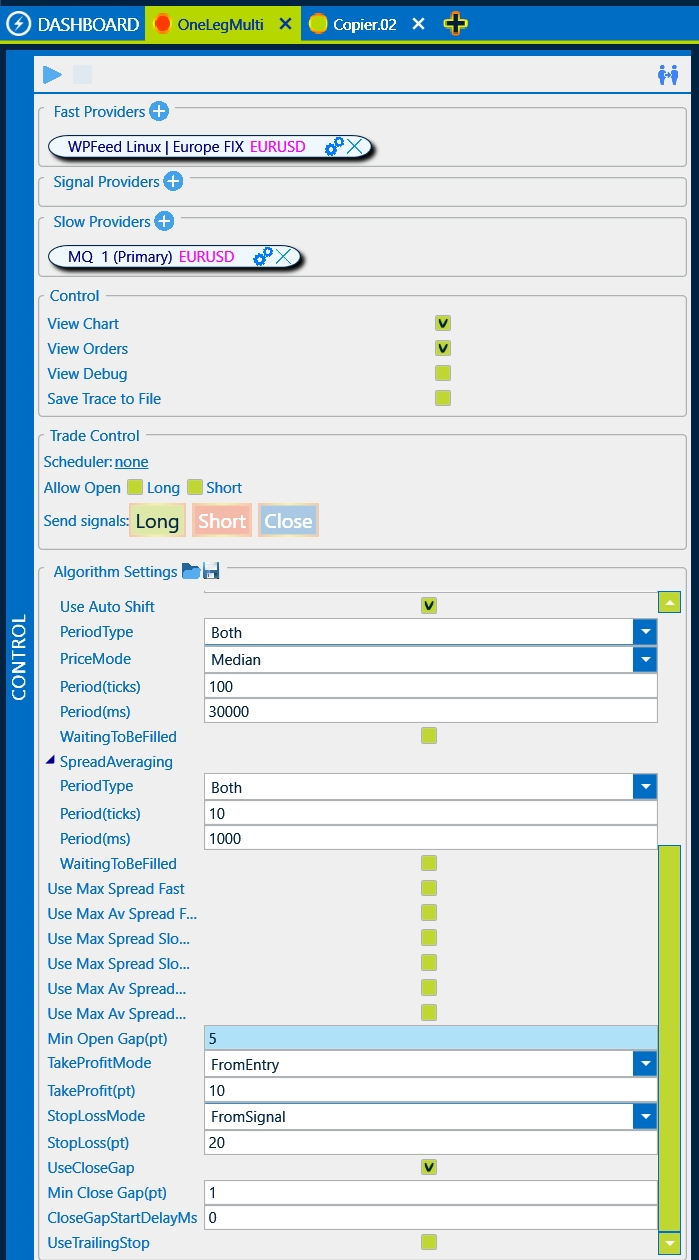
Copier - начало 5

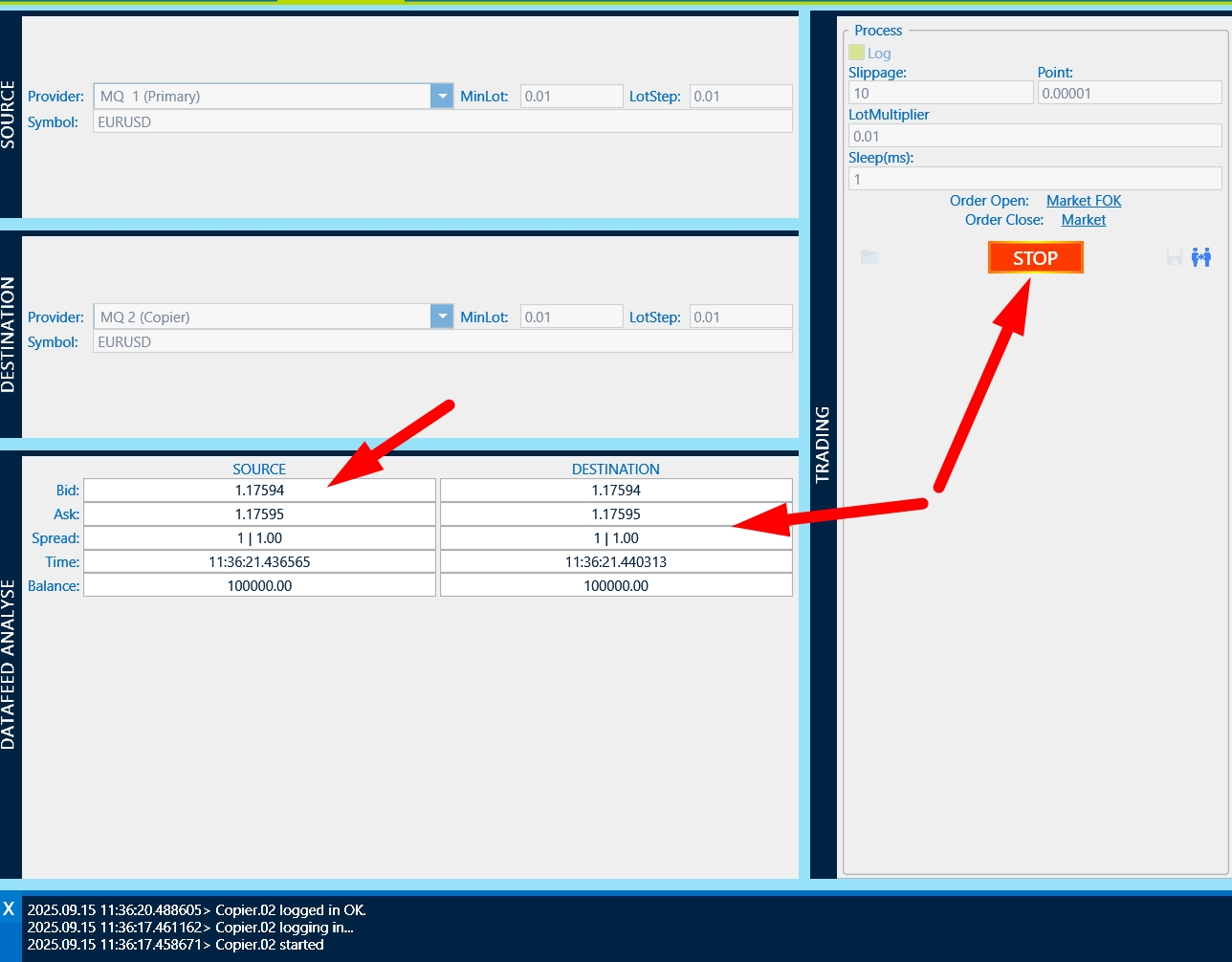
We launch the Copier strategy and after that we launch the “Main” strategy
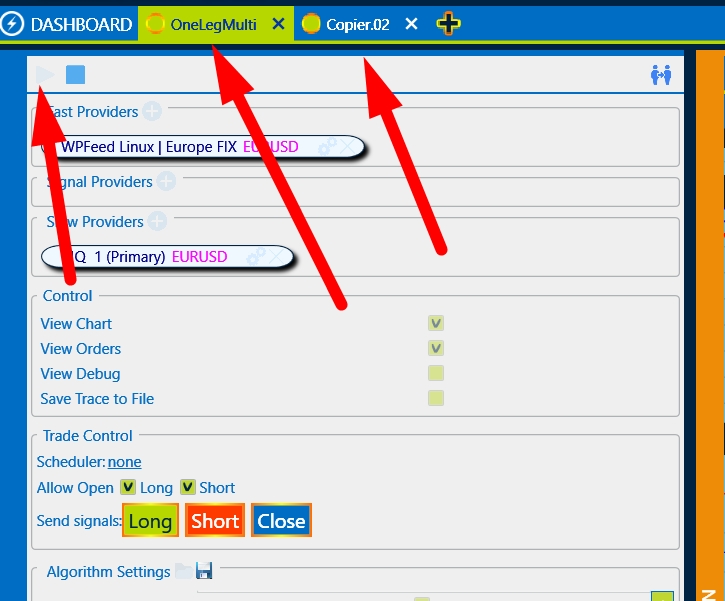
 

Copier - начало 6

    Please note that there are 2 strategies to be launched.

Now we are waiting for deals according to the settings of the main strategy.
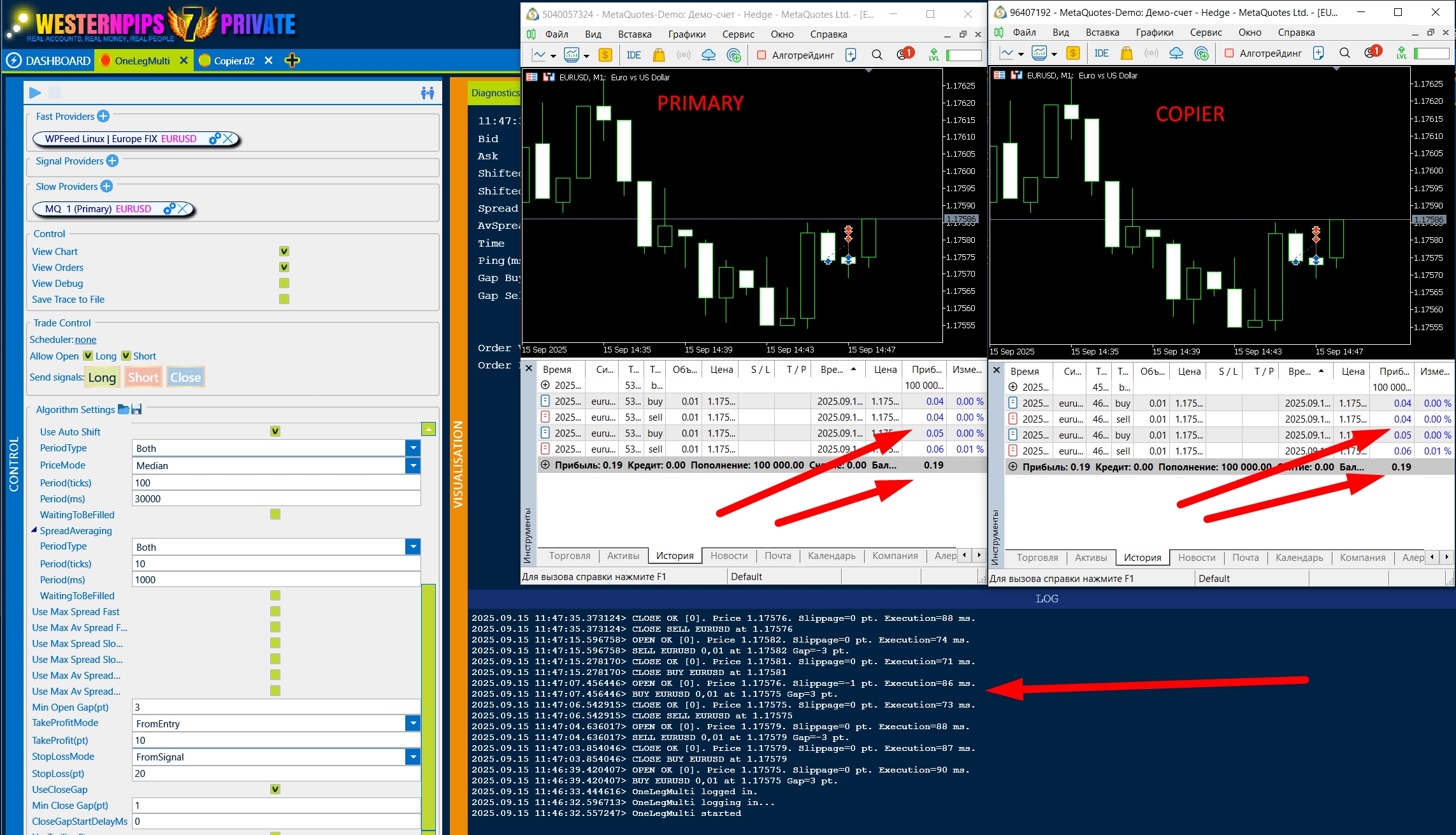
Copier - начало 7

We see that there were 4 transactions and all of them were copied perfectly. Unfortunately, in real trading, there is no 100% copying of all trades because there is a high volatility of the instrument and different execution times on different brokers. But if you find the setting, the broker will not consider such a trade a violation.

Good luck!!!

Was this helpful?

3 Yes  No
Related Articles
  • Low Latency
  • Brokers That Allow Arbitrage
  • Forex VPS
  • B-Book
  • Last Look
  • Toxic Flow
Previously
Remote
Up Next
Clicker in WesternPips Private 7
  • Copyright 2026 Westernpips.com. All Rights Reserved.

LiveInternet counter