WPFeed → Futures (1-leg) compares a fast reference feed (WPFeed) with slow futures on each exchange.
Important: WPFeed is a quote source only. It is not executable. The slow futures book is the tradable leg.
This mode does not use Min Spread (%). That filter belongs to Two-leg WSS and is hidden here.
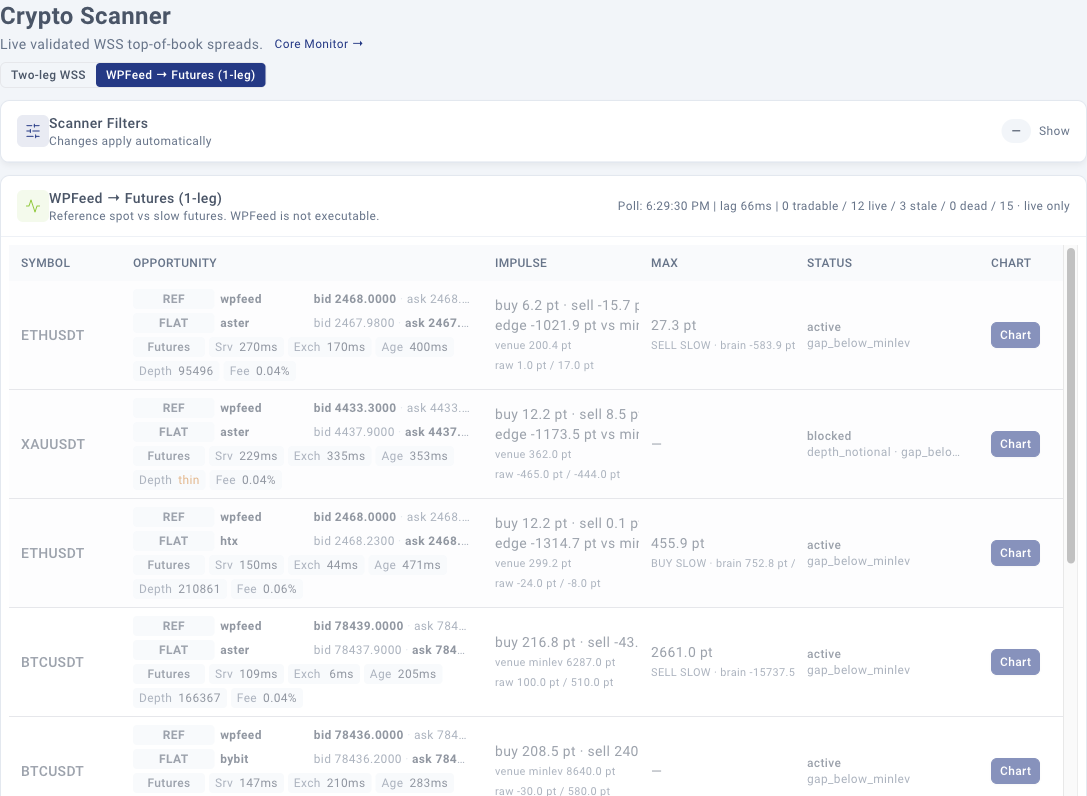
1. How to open 1-leg mode
- Open Crypto Scanner.
- Click WPFeed → Futures (1-leg). The tab turns dark blue when it is active.
- The table title becomes WPFeed → Futures (1-leg).
- Subtitle:
Reference spot vs slow futures. WPFeed is not executable.

The last selected tab is remembered in this browser.
2. Scanner Filters
Changes apply automatically. There is no Save button.
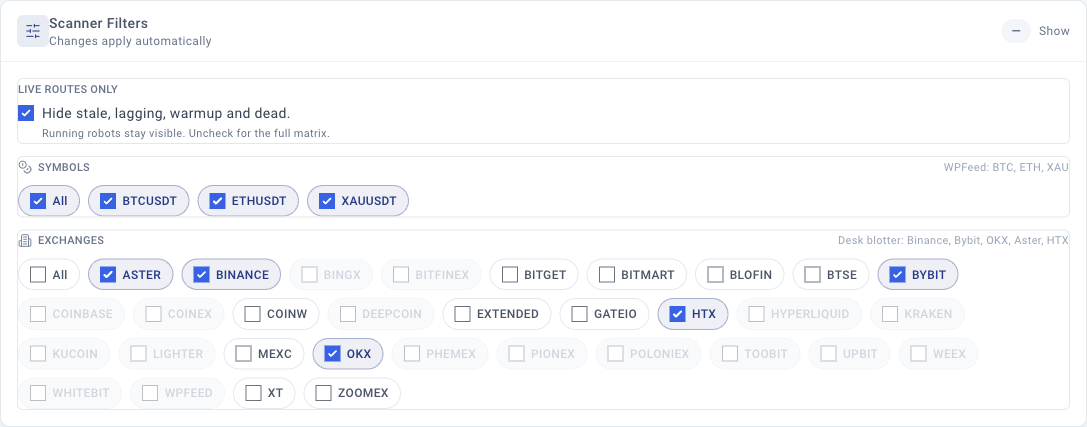
Live routes only
Checked by default.
Hides rows that are stale, lagging, warmup or dead.
A row with a live robot on that venue stays visible even if the route looks noisy.
Uncheck it when you need the full matrix.
Symbols
Possible values: BTCUSDT, ETHUSDT, XAUUSDT.
Tap a chip to show or hide that symbol. Default is all three.
Exchanges
Default desk: BINANCE, BYBIT, OKX, ASTER, HTX.
Grey chips are not available in this mode.
Your symbol and exchange chips are remembered in this browser.
Min Spread (%)
Hidden in 1-leg mode. Do not look for it here.
3. Table overview
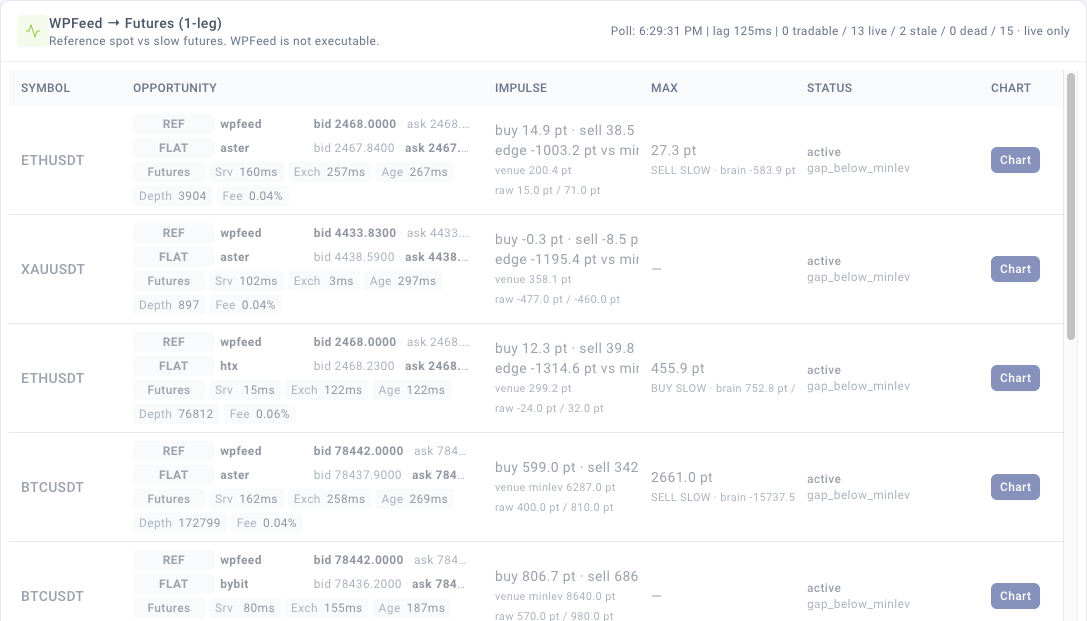
Columns: Symbol, Opportunity, Impulse, Max, Status, Chart.
Row order:
- Venues with a live robot.
- Then Binance, Bybit, OKX, Aster.
- Dead routes and books with no depth go to the bottom.
4. Symbol column
The pair on this row.
Possible values: BTCUSDT, ETHUSDT, XAUUSDT.
5. Opportunity column
This is the map of the two books.
Top line – REF
Badge REF is always the fast feed.
Then the feed name wpfeed and its bid / ask.
Second line – action + slow venue
Left badge: market map, not an order ticket.
Right of the badge: slow exchange name and its bid / ask.
Badge text vs badge color
Text and color answer different questions.
Text – where the impulse is looking:
| Text | Meaning |
|---|---|
| FLAT | No side. Grey. |
| BUY SLOW | Feed is above the futures book. Logical side is buy the future. |
| SELL SLOW | Feed is below the futures book. Logical side is sell the future. |
This is a direction label. It is not a command that the robot already entered.
Color – would a live robot on this venue open right now:
| Color | Meaning |
|---|---|
| Green BUY SLOW | Robot is running here and would buy. Impulse cleared the threshold. Books are live. Row is not stale or dead. |
| Red SELL SLOW | Robot is running here and would sell. |
| Grey badge | Entry is not armed. |
Examples:
- No robot on the venue: scanner can still print BUY SLOW or SELL SLOW, because the map has a side. There is nothing to paint, so the badge stays grey.
- Robot is running, but impulse is below the threshold: Impulse shows a negative edge vs minlev. Text can stay BUY SLOW. Color stays grey.
- Grey BUY SLOW – if you enter, it would be a buy. Nobody enters now.
- Green BUY SLOW – the robot on this venue would buy.
Badges under the book
| Badge | Meaning |
|---|---|
| Futures | Slow leg is a perp, not spot. There is no other market type in this view. |
| Srv | Difference between the times when our server received both quotes, in ms. Dash if it cannot be calculated. |
| Exch | Difference of exchange timestamps, in ms. For reference only. It does not block entry. Dash if missing. |
| Age | Freshness of the snapshot. Examples: 190ms, 2.1s. |
| Stale | Quote is old. |
| Dead | Feed or futures silent for more than 5 seconds. |
| Lagging | Scanner is behind the tick stream. |
| Depth | Size at best price. |
| number in USDT | Size is normal. |
| thin | Thin book, below the depth threshold. |
| none | Venue sent no size. This is not an entry ban by itself. |
| Fee | Taker fee. |
0.05% |
From the fee catalog. |
| Prem 0.035% | Ranked as Premium, not Standard. |
| unknown | Catalog is unclear. Comparison uses VIP0. |
6. Impulse column
First line
buy N pt and sell N pt – gap after auto-shift, in points.
- Positive buy pulls toward buying the future.
- Negative sell (by absolute value) pulls toward selling.
- Dash – no number yet.
Second line, if a robot is running on this venue
edge N pt vs minlev N pt
- edge – how much impulse is above this robot's entry threshold.
- Zero – on the threshold.
- Negative – not enough to enter.
- minlev – robot threshold (GapForOpen plus spread, fee, buffer).
- Small venue N pt – venue threshold without GapForOpen.
If there is no robot, you only see venue minlev N pt. That is the market map, not a live strategy.
warmup next to minlev – the brain is still filling. Do not trust the numbers yet.
Extra lines
raw N pt / N pt– raw gap without auto-shift.raw (brain pending)– auto-shift has not calculated yet.
7. Max column
Dash – no strong extreme for the day (Moscow time).
Otherwise a number in points – best extreme when impulse cleared the threshold.
Below it:
- Side of that peak: BUY SLOW or SELL SLOW.
brain N / N– brain gaps at that minute.minlev N– threshold at that minute.
8. Status column
Top line – state.
Bottom line – reason.
frozen on the top line means the baseline is frozen on the impulse. This is not an error.
Top-line states
| State | Meaning |
|---|---|
| active | Fresh. The row is usable. |
| stale | Quote is old. |
| dead | WPFeed or futures silent for more than five seconds. |
| lagging | Scanner fell behind the tick stream. |
| warmup | Warmup after start or reconnect. |
| blocked | Both legs are live, but a filter closed entry (spread, thin book, gold session, and so on). |
Bottom-line reasons
One word, or two words with a dot.
| Reason | Meaning |
|---|---|
| flat | No side. |
| open_buy | Robot would buy the future. |
| open_sell | Robot would sell the future. |
| gap_below_minlev | Impulse is below the threshold. |
| feed_blind | WPFeed is gone. Look at this first, not a pile of stale venues. |
| reference_stale | Fast feed is stale. |
| slow_stale | Futures book is stale. |
| receive_skew | The two legs arrived too far apart in time. |
| reconnect | Venue just reconnected. |
| warmup | Brain or route is still warming up. |
| slow_spread | Futures spread is too wide. |
| depth_notional | Thin book. |
| session_closed | Gold is outside session. |
| basis_jump | Basis jumped too hard. |
| invalid_book | Broken or empty book. |
| consumer_lag | Scanner cannot keep up with ticks. |
| unchanged_books | Books did not move. |
| no_tick | No tick yet. |
| receive_sla | Combined freshness reject. |
| fast_spread | Feed spread is too wide. |
| gap_le_spread | Gap is not larger than the spread. |
| no_tick_signal | No tick signal. |
| stale | Fallback label when no other reason is set. |
9. Chart column
Blue Chart – tick chart exists for this pair.
Grey Chart – no chart for this exchange.
10. Status line
Top right of the table card.
Example:
Poll: 1:57:35 PM | lag 53ms | 0 tradable / 9 live / 6 stale / 0 dead / 15 · live only
| Field | Meaning |
|---|---|
| Poll | Last page refresh time. |
| lag | Snapshot lag, number or dash. |
| stale next to lag | Snapshot is already old. |
| tradable N | Rows where a robot would enter now. |
| live N | Live rows. |
| stale N | Stale rows. |
| dead N | Dead rows. |
| last number | How many rows are on screen now. |
| live only | Live routes filter is on. |