Strategy OneLeg Hidden
Description
Trading on two slow brokers using signals from one fast source. Entry into the transaction is carried out by disclosing a previously formed hedge. It is provided to maintain several combinations at the same time.
Customization
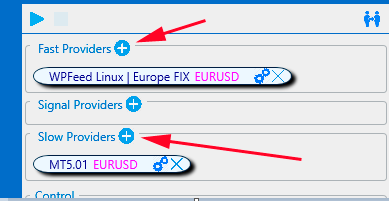
- First of all, you need to choose a fast quote provider and 2 slow brokers (accounts). It is also necessary to specify the traded symbol.
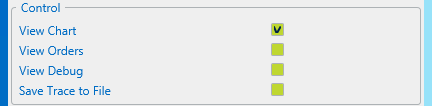
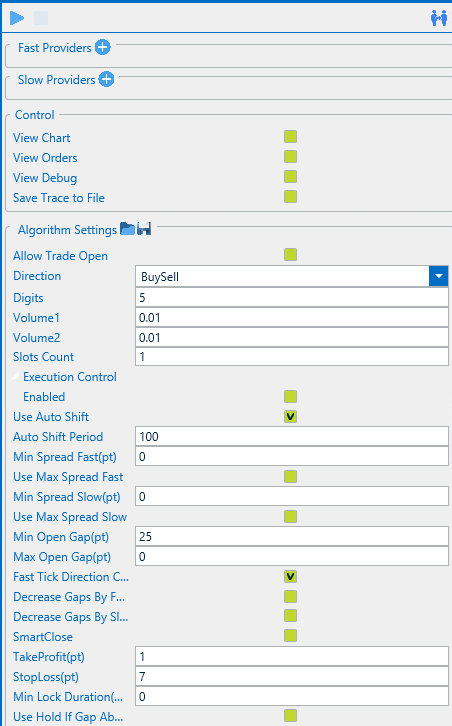
- Setting up “Control” control over trading:

-
- View Chart – visual monitoring of quotes, price discrepancies, gaps and profit/loss on the transaction.
- View Orders – display of all executed orders
- View Debug – displays all the necessary information for in-depth analysis of all transactions
- Save Trace to File – saving quotes for further analysis in the analyzer.
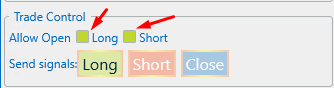
- Setting up trade control “Trade Control”:
- Allow Open (Long, Short) – allow trading in only one direction (check the box for Long or Short) or in both directions (check both boxes)
- Send signals (LONG, SHORT, CLOSE) – opening/closing an order manually from the terminal To enable any item, check the box.
- Setting up the algorithm “Algorithm Settings:
- uploading/recording a set with strategy settings
- Kind :
- Mixer – classic entry into the deal;
- Accumulator (there are trade entries while there are signals from the market) and OneTradeAccumulator (there is a one-time entry into a trade, for example, you need to catch only one FOMC movement) is a new option that is more designed to enter a trade on news volatile market movements. An example of how the algorithm works- when enabled, the Hedge transaction is entered (short and buy) and the Hedge is held until the moment of a strong market surge (news gap, the size of
the gap you specify in the minOpenGap option). When there is a strong movement, for example in Buy (and the Long At Second option is selected), then the Sell order is closed according to the market and the Buy order is closed according to the set Take Profit. Thus, the user now has the opportunity to take news movements without the risk of being banned, since entry and exit in the transaction takes place without an arbitration situation. If there is a strong movement in Sell (and the Long At Second option is selected, then the Hedge is held longer after the price breakthrough in Buy is reached and vice versa
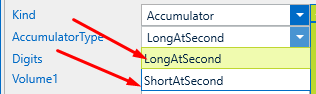
- LongAtSecond и ShortAtSecond – they indicate in which direction the Take Profit closing algorithm will work.
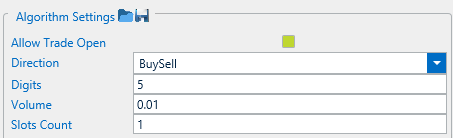
- Allow Trade Open – allow orders to be opened
- BuySell – Setting up the permission to open transactions in one direction, Buy or Sell or both ways BuySell
- Digits – the number of decimal places in quotes
- Volume 1 – the volume of the opened transaction on the first broker
- Volume2 – the volume of the opened transaction on the second broker
- Slots Count- the number of simultaneously traded combinations
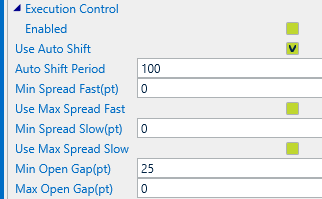
- Execution Control – settings of the order execution speed control module
- Usa Auto Shift – use automatic alignment of quotes between brokers; the price of the second broker is shifted and pulled up to the first;
- Manual Shift Bid(pt) – the number of points to shift the Bid price of the second broker
- Manual Shift Esc(pt) – the number of points to shift the Ask price of the second broker
- Use Max Spread Fast – use the maximum spread filter for a fast quote provider
- Min Spread Slow – use the minimum spread filter for a slow broker
- Min Open Gap – the minimum gap in points for opening a deal on a slow broker
- Max Open Gap – the maximum gap in points for opening a deal on a slow broker
-
- FastTickDirectionConfirmation – entry only if the direction of the last tick on the fast broker coincides with the direction of the transaction
- DecreaseGapsByFastSpread – reduce calculated gaps by the value of the current spread of the fast broker
- DecreaseGapsBySlowSpread – reduce calculated gaps by the value of the current spread of a slow broker
- TakeProfit(pt) – take profit in points
- StopLoss(pt) – stop loss in points
- Min Lock Duration – minimum order holding time in milliseconds
- UseHoldIfGapAbove – use the transaction retention filter
- HoldIfGapAbovePt – the value of the transaction retention filter, if the gap is higher or equal to the specified value in points, then the transaction is held and no closing conditions are met
- SmartClose is a parameter that allows you to adjust the StopLoss and TakeProfit set based on the size of the Slippage in the current transaction. Calculation example:
- StopLoss: estimated opening price = 500, Slippage = 60p, Gap = 50p, Stop Loss = 30p. The deal opened at a price of 560 (estimated price + Slippage).
The calculation of Smart SL is based on the following formula =
560 – (60(slippage)*2)-30(StopLoss). In this case, the Smart SL will be set at a price of 410.
– TakeProfit calculation of the Smartp = Gap +Slippage, i.e. 50 + 60 = 110p from the opening price, i.e. it will work at a price of 560 +110 = 670.
-
 – starting/stopping the strategy

-
- – copying the strategy to a new tab