In the BackTester, a provider is not a live connection but a recorded file of prices (.ticks). You choose the file, and for the trading account you also enter how fast and at what price your broker really fills orders. These numbers decide whether the backtest looks like real trading or is too optimistic.
Edit Provider guides: Overview · Fast and Signal providers · Slow trading account · Backtest provider
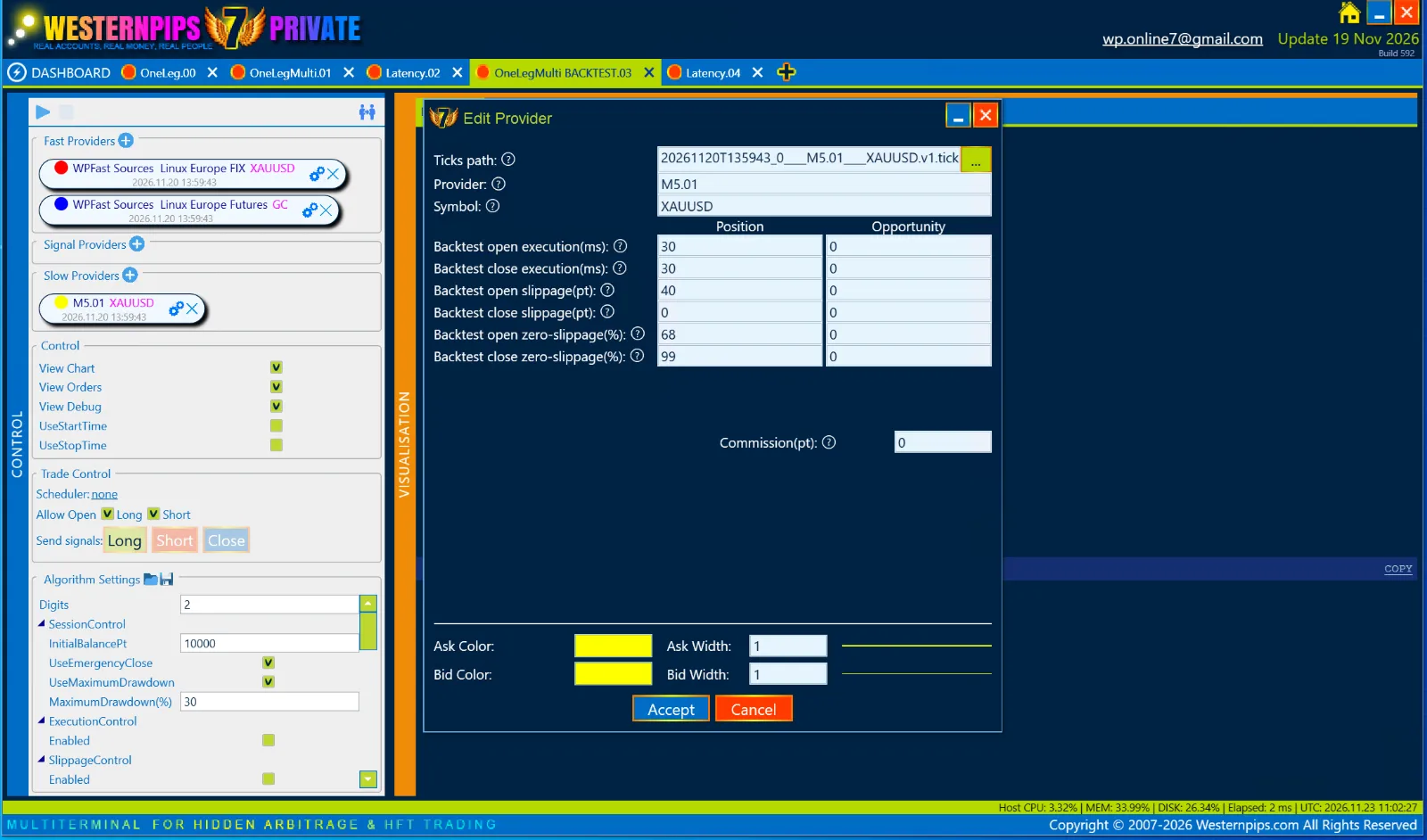
Quick setup in 4 steps
- For every provider of the backtest tab, press “…” next to Ticks path and choose its recorded file. Provider and Symbol fill in by themselves.
- Use files from the same recording for all providers: they start with the same date and time.
- In the slow (trading) provider only, fill the six Backtest fields in the Position column with your broker’s real execution figures (see below).
- Press Accept and run the backtest.
Where the .ticks files come from
You record them yourself: turn on Save Trace to File in a live strategy tab, and the program saves the prices of every provider. The files are in the .traces folder of the program. A name like 20261120T135943_0____M5.01____XAUUSD.v1.ticks means: recording start time, provider number, provider name, symbol. Number 0 is the trading account, 1 and above are fast feeds, 10 is the signal provider. Step-by-step: One Leg Multi first setup and BackTester.
The six execution fields in plain words
| Field | What it means | Example (live XAUUSD) |
|---|---|---|
| Backtest open execution(ms) | How long your broker takes to open a trade. The backtest waits this long and takes the price at that moment. | 30 |
| Backtest close execution(ms) | The same for closing. | 30 |
| Backtest open slippage(pt) | The worst extra price loss on opening. Each trade gets a random value from 0 up to this number. | 40 |
| Backtest close slippage(pt) | The same for closing. Limit, TakeProfit and virtual closes get no slippage. | 0 |
| Backtest open zero-slippage(%) | How many entries out of 100 fill exactly at the requested price. | 68 |
| Backtest close zero-slippage(%) | The same for closes. | 99 |
The example values were measured for one broker and one symbol. Your broker’s values will be different: measure them yourself.
- Position and Opportunity columns: fill Position. Opportunity is used only for special strategy actions; if both are filled, the larger value is used.
- Enter the values in the trading (slow) provider. The same fields in fast and signal providers do not affect the result.
- Commission(pt) is also used in the backtest profit. Fill policy and order types are hidden: in a backtest every order is filled like a market order with the delay and slippage above.
How to get your own numbers
- Trade the minimum lot on your real account until you have at least a few dozen trades.
- Open the Orders tab: it shows the average execution time and slippage for opening and closing.
- Count how many fills had zero slippage (export the Orders tab to CSV for this).
- Enter these numbers in the slow provider of the backtest tab.
Why realistic numbers matter: an example
| Same recorded session | Trades | Result | Per trade |
|---|---|---|---|
| Backtest, all fields 0 | 1,050 | +34,145 pt | 32.5 pt |
| Backtest, measured values | 1,089 | +26,347 pt | 24.2 pt |
| Live trading | 1,082 | +26,200 pt | 24.2 pt |
With zeros the backtest looked about 30% better than reality. With measured values it matched live trading. More in the XAUUSD example.
Common problems
| What you see | Why | What to do |
|---|---|---|
| No trades in the backtest | A provider has no file, files are from different recordings, or opening is not allowed in the strategy. | Choose a file for every provider from one recording and check Allow Open. |
| Every order shows 0 ms and 0 slippage | The values were entered in a fast provider or left at 0. | Enter them in the slow provider. |
| Backtest much better than live | Delay and slippage are lower than at your broker. | Use numbers measured on your live trades. |
| Provider or Symbol empty after choosing a file | The file was renamed. | Use the original file name or type Provider and Symbol yourself. |
Related guides
- BackTester
- One Leg Multi first setup and BackTester
- Edit Provider: slow trading account settings
- Edit Provider: fast and signal providers
Risk warning. Trading Forex, CFDs and cryptocurrencies with leverage carries a high risk of losing money. Backtest results do not guarantee live results: a backtest cannot show how a broker changes its execution in reaction to your trading. Test on a demo account first. Read the full risk warning.