Layout
The Westernpips Private 7 main window is shown in the figure below:
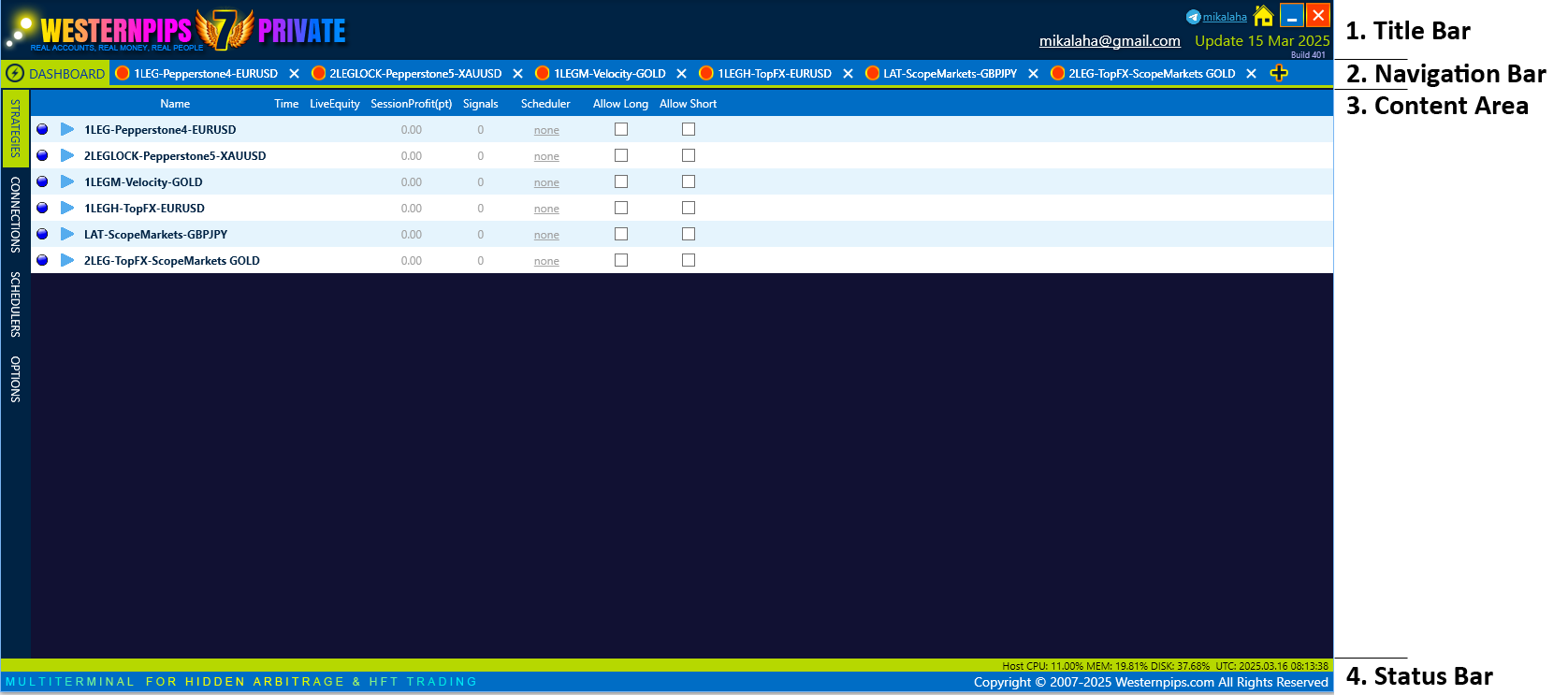
It consists of the following components:
- Title Bar
- Navigation Bar
- Content Area
- Status Bar
Title Bar

Title Bar is showing user login, product version (build and date of update), and connected telegram account if telegram notificatios are enabled in settings.
Navigation Bar

Navigation Bar is used to switch between Dashboard and Trading Processors tabs and to add new trading processor.
There are several types of trading processors:
- Live trading strategies
- One Leg
- TwoLeg Lock
- Multi Leg Spread
- TwoLegSimpleHedge
- One Leg Multi
- One Leg Hidden
- Two Leg Standard
- Remote
- Copier
- Traces Analysis Tool
- Backtester
- One Leg Multi
- One Leg Hidden
- Latency
- Two Leg Standard
Dashboard contains following tabs:
- Strategies (live strategies list)
- Connections (used trading providers connectors)
- Schedulers (news and working hours)
- Options
Content Area
Content Area is showing selected dashboard tab or selected trading processor.
Status Bar
Status Bar is showing following information:
- CPU Loading %
- Memory Usage %
- Disk Usage %
- Current UTC Time