Westernpips DocsWesternpips Docs
  • Home
  • FAQ
  • Documentation
  • Forums
  • Home
  • FAQ
  • Documentation
  • Forums
  • Crypto Trader
    • Crypto Scanner - 1 Leg
    • Crypto Scanner - 2 Leg
    • Crypto Table
  • Getting Started
    • Web Portal my.westernpips.com
      • Web Portal Password Recovery
      • How to Buy Westernpips Products?
    • Products Installation
    • Prerequisites
      • .NET Desktop Runtime Installation
      • ASP.NET Core Runtime Installation
      • Microsoft Redistributable Installation
    • System Requirements
    • Installation Troubleshooting
  • Westernpips Golden Tools 3.5.7
    • Downloading
    • First Run
    • Installing a Westernpips Products Using WGT
    • Working with Installed Products
    • WGT Update
  • Westernpips Private 7
    • How to Check Which Quote Feed Is Faster
    • Installing and First Run
    • License Activation and Login
    • Change License IP, Add new IP
    • User Interface
      • Main Window
      • Dashboard
        • Options
        • Strategies
        • Connections
        • Schedulers
    • Trades Discovery, Check Orders Duration
    • WESTERNPIPS PRIVATE 7 ALGOS
      • OneLeg
        • OneLeg: Before You Start
        • OneLeg First Setup, Step by Step
        • OneLeg Key Parameters with an XAUUSD Example
        • OneLeg Troubleshooting
      • Two Leg Simple Hedge
      • Two Leg Lock
      • Multi Leg Spread
      • One Leg Multi
      • OneLegHidden
      • Two Leg Standard
      • Remote
      • Copier
      • Clicker in WesternPips Private 7
      • Session Control — Quick Guide
      • Exucution Control — Quick Guide
      • Slippage Control - Fast Guide
      • Add/Edit Provider Window Settings
      • BackTester
      • Setting up a connection with the Broker Terminal via the EA connector
    • Connectors
      • Common Settings and Operation
        • FIX Connection Settings
        • FIX Logs
      • Trading and Fast Sources Connectors
        • 24Exchange Connector
        • Active Financial API Connector
        • Binance Connector
        • Bitfinex Connector
        • CBOE FIX Connector
        • Celer FIX Connector
        • CFH FIX Connector
        • CTrader FIX Connector
        • DukasCopy FIX Connector
        • DxFeed FIX Connector
        • Euronext FIX Connector
        • Exante FIX Connector
        • FastMatch ITCH Connector
        • FlexTrade FIX Connector
        • Fortex FIX Connector
        • FXCM FIX Connector
        • FxPig FIX Connector
        • GCEX FIX Connector
        • Gold-i Matrix FIX Connector
        • Integral FIX Connector
        • LMAX API Connector
        • LMAX FIX Connector
        • MaxxTrader FIX Connector
        • MT EA Connector
        • M4 Server Connector
        • M5 Server Connector
        • OGM FIX Connector
        • OKX Connector
        • OneZero FIX Connector
        • PrimeXM FIX Connector
        • Remote Connector
        • Rithmic Connector
        • RoE FIX Connector
        • Saxo FIX Connector
        • SolidFX FIX Connector
        • Spotex FIX Connector
        • TraderMade FIX Connector
        • Universal Connector
        • Universal Fast Connector
        • XenFin FIX Connector
        • XTRD FIX Connector
  • Westernpips Webcliker
    • System Requirements
    • Installer
    • Agent
    • UI Settings
    • UI Logs
    • Start/Stop
    • Connections
    • Trade platforms
      • CMC Markets
      • M5 Web
      • M4 Web
      • TRADE NATION
      • Exness Web
      • Universal cliker
      • IG Trading Platform
      • MEX / MultiBank
      • ByBit
      • EXANTE
      • IQ Option
      • Plus500
      • Quotex
    • Risk Warning
  • Glossary
    • Latency Arbitrage
    • Fast Price Feed
    • Execution Latency
    • Slippage
    • FIX API
    • Requote
    • Forex Arbitrage
    • Toxic Flow
    • Last Look
    • B-Book
    • Forex VPS
    • Brokers That Allow Arbitrage
    • Low Latency

CMC Markets

174 views 0

Trade Platforms — CMC Markets

CMC Markets - cmc

1. Selecting CMC Markets in  UI

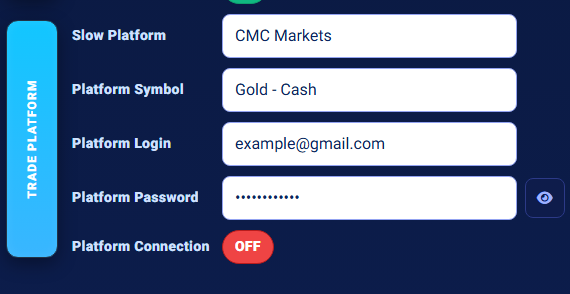
To use CMC Markets as the trading platform, first open Webclicker Panel and set:

Slow Platform = CMC Markets

After selecting CMC, fill in the platform credentials:
CMC Markets - 22

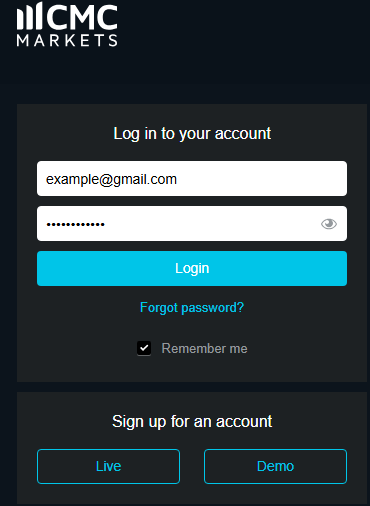
Platform Login — your CMC Markets login or email.
Platform Password — your CMC Markets password.
Platform Symbol — the exact instrument name that should be traded on CMC Markets.
CMC Markets - 33 1

The UI sends these values to the agent when the user starts the platform login process.

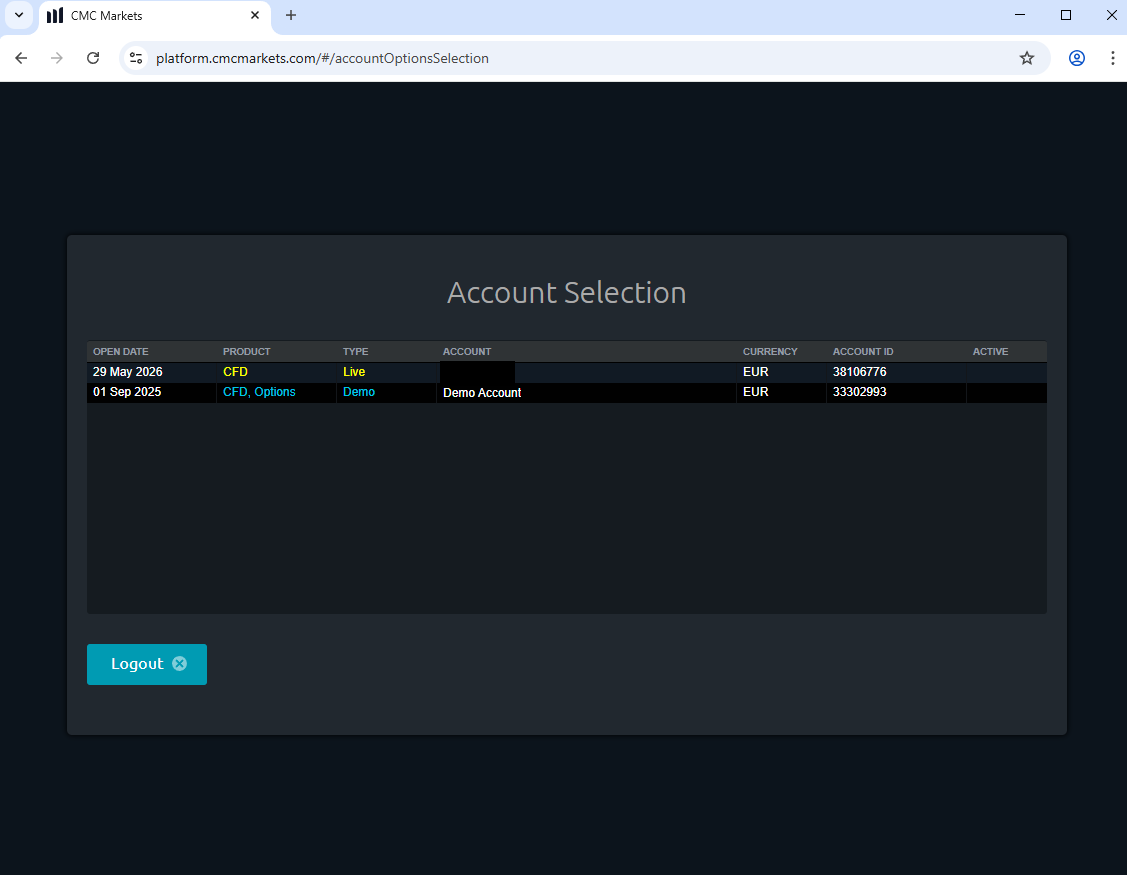
If you already have Live and Demo accounts ,please choose manually what type of account you want to use
CMC Markets - cmc 9

2. About CMC Markets

CMC Markets is an online trading and investing group that started in 1989.
The company provides access to markets through its own trading technology and has been focused on online trading platforms,CFD trading, and market access for many years.

3. Required settings for CMC Markets

Before pressing START, make sure settings fields are configured

4. Instrument initialization on CMC
CMC Markets - 77

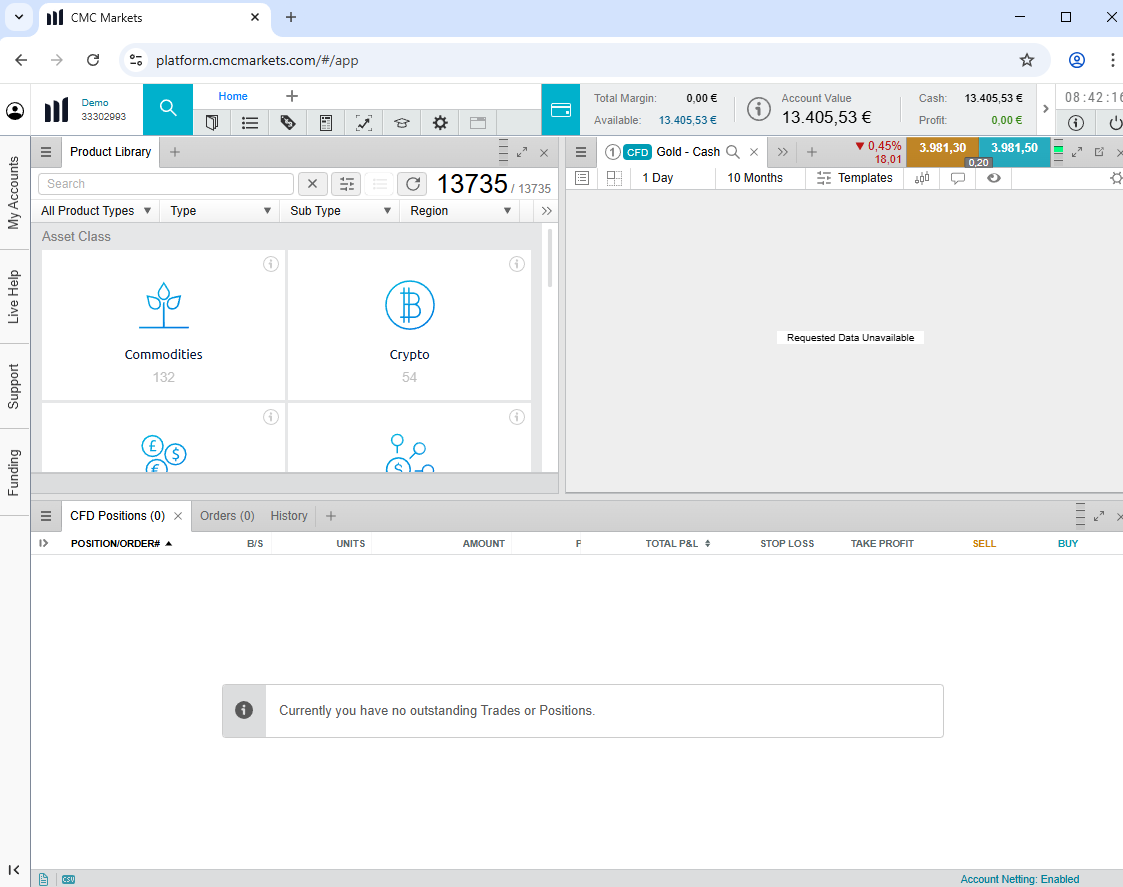
After successful login, the agent can initialize the required instrument.

For CMC, the Platform Symbol field is very important. If the instrument name on CMC is not exactly the same as the normal market symbol, use the exact CMC name in Platform Symbol. For example XAUUSD can be “Gold – Cash” .

5. Platform ready status

After login, Webclicker checks whether the CMC platform is ready. The CMC ready check confirms that:

  • the full CMC UI is loaded;
  • the browser is not on the login screen;
  • there is no session timeout or disconnect banner;
  • the platform account balance can be read if available.

The CMC module also reads the account balance .

When the platform is ready, WC UI shows Platform Connection: ON and the START/STOP flow can continue.

6. How the agent opens trades on CMC
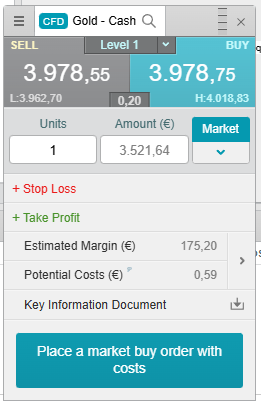
CMC Markets - 88

When the algorithm detects an opening condition, it sends an order command to the agent. For CMC, the agent supports both:

BUY open
SELL open

The agent opens the CMC ticket, selects the correct side, sets the lot size, handles CMC overlays or confirmation checkboxes,
places the market order, and then tries to read the order confirmation receipt.

7. How the agent closes trades on CMC
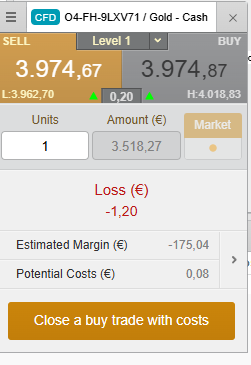
CMC Markets - 99

For closing trades, the CMC module supports:

Close BUY
Close SELL

The agent calls the CMC close-trade logic, passing the side and instrument. If the close result is not successful, the agent raises an error so the problem can be shown in Orders LOG.

8. Typical CMC issues

  • Wrong Platform Symbol(The agent may log `SYMBOL_INIT_FAILED` if the instrument selected in Webclicker does not match the CMC platform instrument name. Use the exact CMC instrument name in Platform Symbol)
  • CMC platform loading does not finish(The agent waits for the full visible UI, not just for the page URL. If CMC stays blank, stuck, or returns to login, the login can fail)
  • Platform Login or Password is empty(For CMC, login and password are required before START. The UI warns the user if they are missing)
  • Order opened but receipt was not detected(The agent can sometimes recover this by checking whether the Positions count increased. If this happens, the order may appear in Orders History with a fallback source based on position delta and snapshot data)
  • Session timeout or disconnected state(The ready check rejects CMC as loaded if a session timeout or disconnect banner is detected. In this case, reconnect or restart the CMC login flow)


Was this helpful?

Yes  No
Related Articles
  • Low Latency
  • Brokers That Allow Arbitrage
  • Forex VPS
  • B-Book
  • Last Look
  • Toxic Flow
Previously
Trade platforms
Up Next
M5 Web
  • Copyright 2026 Westernpips.com. All Rights Reserved.

LiveInternet counter