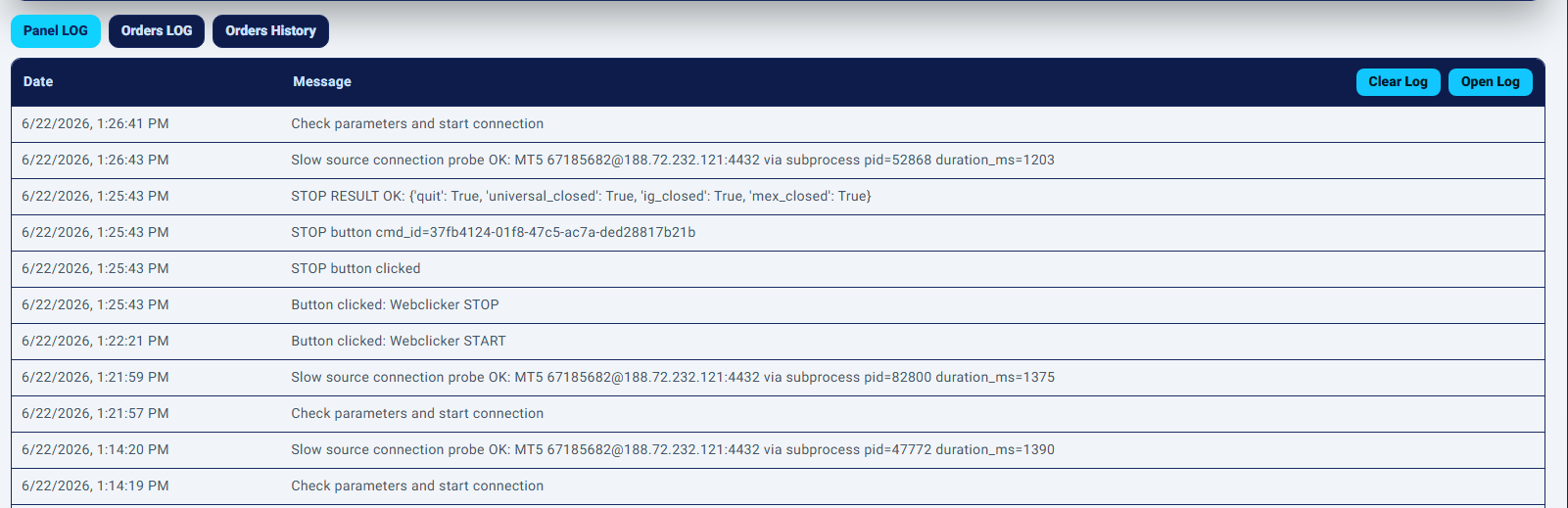
UI Logs
The WC UI Logs section is located below the main Webclicker settings panel. It contains three tabs: Panel LOG, Orders LOG, and Orders History. These tabs help the monitor Webclicker activity, check execution messages, and review completed trading history directly from the web interface.
Panel LOG shows general UI and Webclicker panel events.
Orders LOG shows detailed messages related to order execution and trading actions.
Orders History shows structured trade records with prices, time, gap, slippage, and profit.
1. Panel LOG
The Panel LOG tab displays general Webclicker panel messages. It is mainly used to show user-side and system-side events from the Webclicker interface.
Typical messages in this tab may include:
– settings save or clear events;
– Webclicker start or stop actions;
– connection status messages;
– UI actions performed from the Webclicker panel;
– warning or error messages related to panel operations.
2. Orders LOG
The Orders LOG tab displays order-related system messages. It is used to monitor what happens during order opening, closing, confirmations, execution attempts, errors, and session results.
This tab is useful for checking:
– whether an order was opened;
– whether an order was closed;
– what ticket ID was received;
– what price was reported by the agent;
– whether a fallback price was used;
– whether profit, pips, slippage, or close data were calculated;
– whether the agent or platform returned an error.
3. Orders History
The Orders History tab displays structured trading history. Unlike Orders LOG, which is a message log, Orders History is a table of actual trade records.
The table contains the following columns:
Ticket — the order or position identifier returned by the trading platform.
Type — order direction, usually `BUY` or `SELL`.
Symbol — the trading symbol .
Lots — the traded volume.
Open Price — the price at which the trade was opened.
Close Price — the price at which the trade was closed.
TP — Take Profit value, if available.
SL — Stop Loss value, if available.
Open Time — the time when the trade was opened.
Close Time — the time when the trade was closed.
Slippage (pips) — the difference between the signal price and the actual open price, calculated in pips.
Open_ms — order opening execution time in milliseconds, when available.
Open_gap — the gap value at the moment of opening.
Close_gap — the gap value at the moment of closing.
Profit ($) — trade result in account currency .
Profit (pips) — trade result in pips.