Trade Platforms — Trade Nation

1. Selecting Trade Nation in UI
To use Trade Nation as the trading platform, open Webclicker Panel and set:
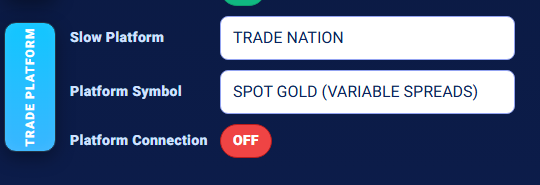
Slow Platform = TRADE NATION
Platform Symbol field is very important. If the instrument name on TRADE NATION is not exactly the same as the normal market symbol, use the exact TRADE NATION name in Platform Symbol. For example XAUUSD can be “SPOT GOLD (VARIABLE SPREADS)” .
2. About Trade Nation
In Webclicker, Trade Nation is used as the trade execution platform.
Trade Nation is an online trading provider that offers access to financial markets through its own trading platform and supported third-party platforms. The company positions itself around low-cost trading, fixed spreads on many markets, transparency, and a simple trading experience for both new and experienced traders. Trade Nation states that it has been helping traders since 2014 and highlights its experience in spread trading and CFD trading.
Trade Nation provides access to markets such as forex, commodities, indices, and shares. Its website also describes the TN Trader platform as its in-house trading platform available across desktop and mobile, with additional tools such as chart features, daily reports, and signal-related features.
Trade Nation operates under several regulated entities. Its website lists regulatory bodies including the FCA in the United Kingdom, ASIC in Australia, FSA in Seychelles, SCB in the Bahamas, and FSCA in South Africa. As with all CFD and leveraged trading platforms, users should understand that trading carries risk and can result in losses.
Webclicker calculates the gap logic from the selected fast and slow quote sources, and the local WP Agent controls the Trade Nation web terminal through the browser.
3. Platform Login and Password
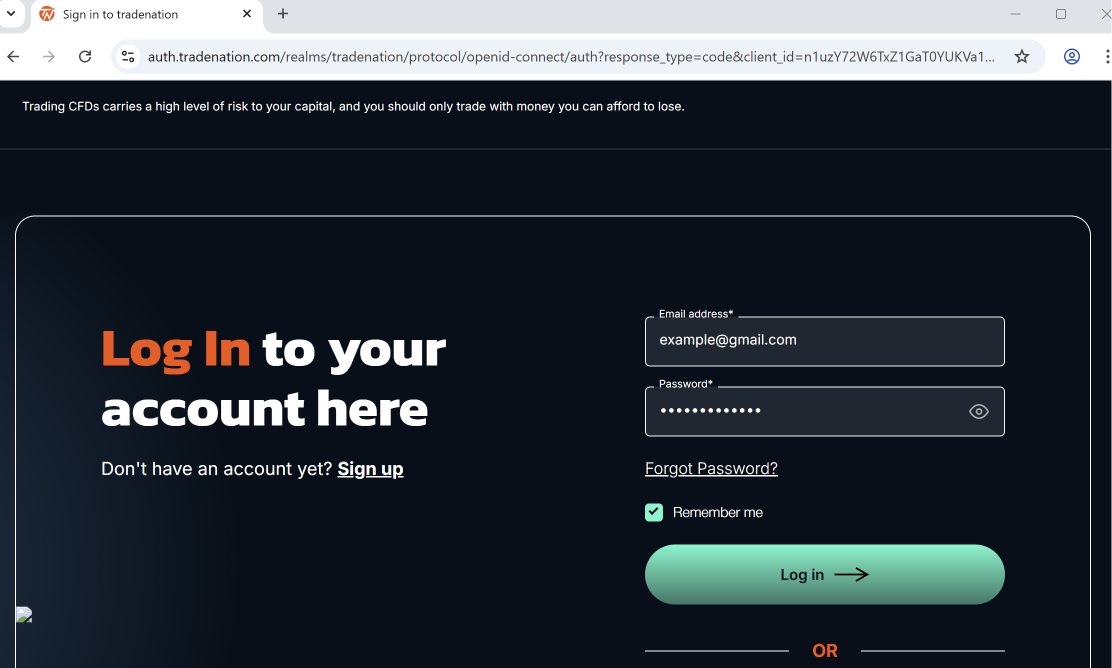
The user still needs valid Trade Nation credentials, but they enter them manually inside the Trade Nation web terminal opened in Chrome.
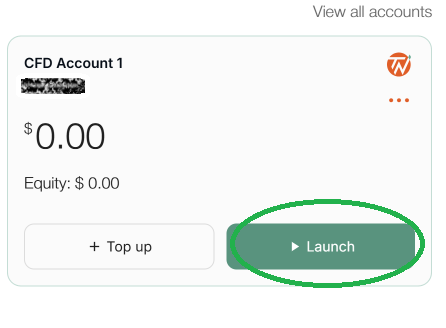
Launch Real
or Demo(Practice account )
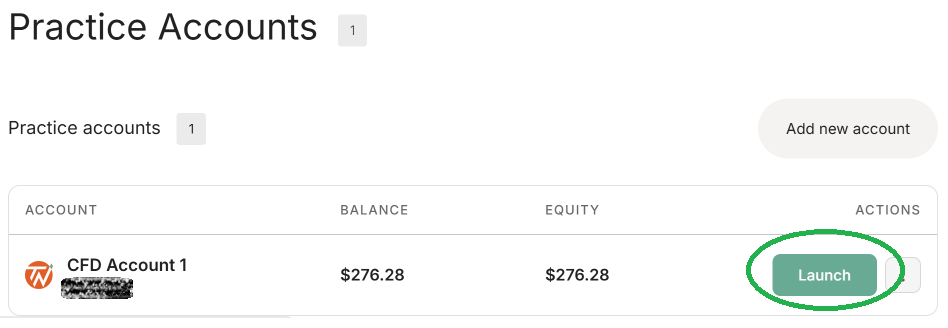
Important : account type CFD
4. Required settings before START
Before pressing START, make sure settings are configured.
5. START flow for Trade Nation
When the user clicks START with Slow Platform = TRADE NATION, the process works like this:
1. WC UI saves the current settings.
2. The UI sends the start command to the local WP Agent.
3. The agent starts a Trade Nation session in manual URL mode.
4. The agent detects when the Trade Nation interface is ready.
5. After the terminal is ready, Webclicker can continue with platform preparation and trading.
The Trade Nation module can read account balance.
6. Trade Nation preparation
After the Trade Nation terminal is ready, the agent may prepare the ticket for trading. Preparation can happen automatically after the platform has been ready for a short time, or when the backend asks the agent to prepare a ticket.
During preparation, the agent:
– closes Trade Nation notification widgets if they are blocking the interface;
– searches for the selected market symbol;
– opens the Trade ticket;
– sets the trade amount;
– opens ticket settings;
– enables One Click Trading if it is not already enabled;
– saves the ticket settings;
– keeps the ticket ready for fast order execution.
7. How the agent opens trades on Trade Nation
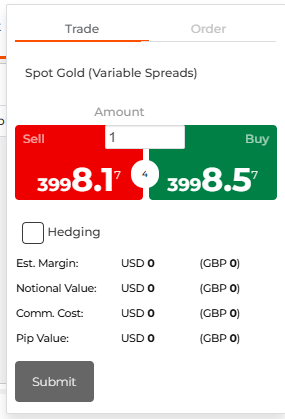
Trade Nation supports:
BUY open
SELL open
8. How the agent closes trades on Trade Nation
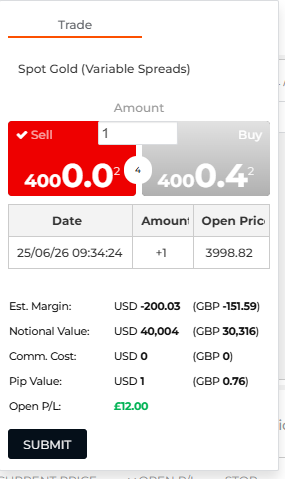
Trade Nation supports:
Close BUY
Close SELL
9. Common Trade Nation issues
- Chrome opens with a blank page(This is expected if no previous Trade Nation terminal URL is stored. The user should manually open the Trade Nation terminal URL and sign in)
- Platform Connection does not become ON(The agent did not detect the ready Trade Nation terminal. Make sure the Trade Nation terminal is fully loaded and the page shows platform elements such as Market Explorer, Open Positions, account balance, and search input)
- Login required or session expired(If the page is on login, marketing, or session-expired state, the agent keeps waiting for manual login and returns `waiting_user_login: true`)
- Symbol not found(The value in Platform Symbol may not match the Trade Nation market name. Use the exact market name shown in the Trade Nation terminal. For FX symbols, both compact and slash formats may work, but complex names should be entered exactly)
- Ticket not opened(The agent could not find the market row or the Trade button, or the ticket panel did not open. Check the platform symbol and make sure the Trade Nation interface is not blocked by popups)
- One Click Trading is not ready(The agent tries to enable One Click Trading during ticket preparation. If this fails, the ticket may not become `open_ready`. Restart the Trade Nation session and let the agent prepare the ticket again)
- Close skipped: no_matching_position(The agent could not find an open position matching the requested side and instrument. Check whether the trade is still open and whether the platform symbol matches the position shown in Trade Nation)