Session Control — Quick Guide
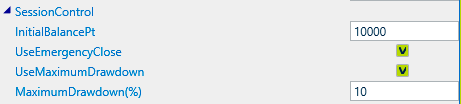
What these settings do
The Session Control module in Westernpips Private 7 is designed to protect your strategy from uncontrolled losses and technical desynchronization.
It manages the session balance, drawdown control, and emergency state for all OneLeg-based algorithms (especially OneLegMulti).
⚙️ Settings Overview
| Setting | Type | Default | Description |
|---|---|---|---|
| InitialBalancePt | integer | 10 000 | Starting equity of the trading session in points, used as a base for drawdown calculations. |
| UseMaximumDrawdown | boolean | true | Enables automatic drawdown control. |
| MaximumDrawdown(%) | integer | 10 | Defines the maximum allowed drawdown percentage from the session’s highest equity. |
| UseEmergencyClose | boolean | true | Enables automatic emergency state when order desynchronization is detected. |
🧭 1. InitialBalancePt
What it does
Defines the starting equity in points for your session.
This is the anchor for calculating drawdown limits.
If set to 0, the system immediately triggers “Drawdown Reached” and stops opening trades.
Formula
| Trading Style | Suggested Value |
|---|---|
| Low-volatility / Scalping | 5 000–10 000 pt |
| Normal trading session | 10 000–20 000 pt |
| High-volatility / Long sessions | 20 000–50 000 pt |
Always use values greater than 0 and measure them in points (not money).
⚙️ 2. UseMaximumDrawdown
Description
Activates or deactivates automatic drawdown control.
When enabled, the controller continuously tracks your session equity in points:
-
Each time the equity reaches a new high,
MaximumEquityPtis updated. -
If the equity falls below the calculated threshold, state changes to DrawdownReached and new entries are blocked.
When disabled, 100% drawdown is allowed — protection is effectively off.
Recommendation
Always keep enabled for live or demo trading.
Disable only during debugging or experimental testing.
⚙️ 3. UseEmergencyClose
Description
Monitors synchronization between strategy orders and broker-side live orders.
If a mismatch is detected (for example, due to network delay or manual intervention),
the session automatically enters Emergency mode.
Behavior
-
Checked every 5 seconds.
-
If mismatch detected → State = Emergency,
StateChanged = true. -
In Emergency:
-
No new trades can be opened.
-
Existing trades are not managed automatically until reset.
-
Recommendation
Keep ON at all times during real trading — prevents “ghost” or stuck orders.
Use external alerts or your Telegram bot to notify about the Emergency state.
⚙️ 4. MaximumDrawdown(%)
What it does
Specifies the maximum percentage of loss from the session’s highest equity before trading halts.
Example
If InitialBalancePt = 10 000 and MaximumDrawdown = 10% →
the threshold is 9 000 pt.
If the equity later rises to 12 000, the threshold moves to 10 800 pt (trailing logic).
Recommended Values
| Risk Profile | MaximumDrawdown(%) |
|---|---|
| Conservative | 5–8% |
| Balanced | 10–15% |
| Aggressive | 18–25% |
🔁 5. How the System Works Step-by-Step
-
Session Start
-
InitialBalancePtsets the reference equity. -
MaximumEquityPtis initialized to the same value. -
The drawdown threshold is calculated.
-
UseMaximumDrawdownandUseEmergencyClosedefine session behavior.
-
-
Active Trading
-
While state = Trading, the algorithm can open and close trades freely.
-
-
Trailing Drawdown
-
Each new profit peak increases
MaximumEquityPt. -
The drawdown threshold moves upward accordingly.
-
-
Drawdown Trigger
-
If
sessionEquityPt ≤ DrawdownEquityThresholdPt,
state switches to DrawdownReached → new trades blocked.
-
-
Emergency Trigger
-
If order mismatch detected, state switches to Emergency.
-
Normal trade management is paused until manually reset.
-
-
Recovery
-
After checking positions and restarting strategy,
use SwitchToTrading() or restart the algo to resume.
-
📊 6. Preset Templates
| Profile | InitialBalancePt | MaximumDrawdown(%) | UseMaximumDrawdown | UseEmergencyClose |
|---|---|---|---|---|
| Safe | 10 000 | 8–10% | ✅ | ✅ |
| Balanced | 15 000–20 000 | 12–15% | ✅ | ✅ |
| Aggressive | 20 000–30 000 | 18–25% | ✅ | ✅ |
⚠️ 7. Typical Mistakes & Fixes
| Mistake | Result | Fix |
|---|---|---|
InitialBalancePt = 0 |
Instant DrawdownReached (trading blocked) | Always use > 0 |
| Too small InitialBalancePt | Frequent false drawdowns | Increase value or reduce drawdown % |
UseEmergencyClose = false |
Stuck or ghost orders possible | Keep enabled |
Disabled UseMaximumDrawdown |
No drawdown protection | Avoid in live trading |
💡 8. Calculation Examples by Symbol
| Symbol | Tick Size | Avg. Daily Range | Recommended InitialBalancePt | Explanation |
|---|---|---|---|---|
| EURUSD | 0.0001 | ≈ 900 pt (≈ 90 pips) | 10 000 pt | Covers ~10 daily ranges; 10% drawdown = 900 pt |
| XAUUSD (Gold) | 0.01 | ≈ 2 000 pt (≈ 20 USD) | 20 000 pt | 10% drawdown ≈ 2 000 pt ($20 move) |
| BTCUSD | 1 USD | ≈ 5 000 pt | 50 000 pt | 20% drawdown = 10 000 pt ($10k BTC move) |
| GER30 (DAX) | 0.1 | ≈ 3 000 pt | 30 000 pt | 15% drawdown = 4 500 pt |
| US30 (Dow Jones) | 1 USD | ≈ 4 000 pt | 40 000 pt | 10% drawdown = 4 000 pt |
Example — EURUSD
Threshold = 10 000 − (0.01 × 10 000 × 10) = 9 000 pt
If equity drops below 9 000 → DrawdownReached → new entries disabled.
If later equity grows to 11 500 → new threshold = 10 350 pt.
Example — XAUUSD
Threshold = 20 000 − 2 000 = 18 000 pt
Trading stops if equity drops below 18 000 pt.
Example — BTCUSD
Threshold = 50 000 − 10 000 = 40 000 pt
Trading halts after ~$10 000 loss from session high.
Example — GER30
Threshold = 30 000 − 4 500 = 25 500 pt.
Example — US30
Threshold = 40 000 − 4 000 = 36 000 pt.
✅ Summary
| Setting | Purpose | Default | Recommended |
|---|---|---|---|
| InitialBalancePt | Base session equity in points | 10 000 | 10 000–50 000 |
| UseMaximumDrawdown | Enables drawdown protection | True | True |
| MaximumDrawdown(%) | % loss allowed from equity high | 10 | 8–15 |
| UseEmergencyClose | Emergency protection for desync | True | True |