Strategy Two Leg Lock
Algorithm Two Leg Lock Arbitrage – The main purpose of creating this algorithm was complete masking and a completely new approach to arbitration in which the arbitration signal no longer serves as the entry point to the transaction, but on the contrary, an open transaction is closed by the signal. At the same time, trading is conducted in parallel on two different accounts of a slow broker (or on two different slow brokers). The broker has less and less chance to recognize the use of arbitrage/scalping on your account because now the duration of all transactions exceeds the set limits, and the opening prices of transactions do not coincide with the price gap point, in the account history all transactions look chaotic – there are transactions with different numbers of profit/loss points and different time duration, and that’s it This is a reliable method of masking and protecting your account. To receive an arbitrage signal, a fast quote provider is used, and the transactions themselves are opened on different accounts/terminals of two slow brokers. There is a smooth transfer of capital between accounts and an increase in the total total deposit on two accounts. The algorithm provides control of the direction of buy/sell/full lock orders on both accounts, as well as control of possible risks.
| SETTINGS NAME | DESCRIPTION |
| LockType
|
Choosing the type of blocking Buy/Sell/Full:
In Buy mode at the first start of the strategy, locking Buy orders are placed on the first slow broker/account and Sell on the second slow broker/account (trading is conducted on the first slow broker only on sell signals, on the second slow broker only on buy signals). When a sell signal appears on the first slow broker, the Buy order is closed and after the conditions for fixing profit/loss on the MinlevelClose or FixTP/FixSL signal, the locking Buy order is placed again. When a buy signal appears on the second slow broker, the Sell order is closed and after the conditions for fixing profit/loss on the MinlevelClose or FixTP/FixSL signal occur, the locking Sell order is placed again. In the Sell mode at the first start of the strategy, locking Sell orders are placed on the first slow broker/account and Buy on the second slow broker/ account (trading is conducted on the first slow broker only by buy signals, on the second slow broker only by sell signals). When a buy signal appears on the first slow broker, the Sell order is closed and after the conditions for fixing profit/loss on the MinlevelClose or FixTP/FixSL signal, the locking Sell order is placed again. When a sell signal appears on the second slow broker, the Buy order is closed and after the conditions for fixing profit/loss on the MinlevelClose or FixTP/FixSL signal occur, the locking Buy order is placed again. In Full mode at the first start of the strategy, locking Sell and Buy orders are placed on the first slow broker/account, as well as Buy and Sell orders on the second slow broker/account (trading is conducted on both accounts using buy/sell signals). When a buy/sell signal appears on the first slow broker, the Sell/Buy order is closed and after the conditions for fixing profit/loss on the MinlevelClose or FixTP/FixSL signal, the locking Sell/Buy order is placed again. When a sell/buy signal appears on the second slow broker, the Buy/Sell order is closed and after the conditions for fixing profit/loss on the MinlevelClose or FixTP/FixSL signal, the locking Buy/Sell order is placed again. |
| Lot1 | The lot size for opening a deal on the first broker. |
| Lot2 | The lot size for opening a deal on the second broker. |
| MinOrderTime(sec) | The minimum duration of the order in seconds. All transactions in duration will always be longer than the set value. |
| MinOrderPoint | The minimum number of points (profit/loss) for open trades in the block for starting the signal trading algorithm |
| Algorithm for opening a lock (opening a deal on a signal) by placing a StopLoss | |

order by the value of pt (points) from the current price. If the StopLoss does not work within the set amount of time in milliseconds, the lock will not be opened and

the current signal will be skipped, and the set StopLoss will be deleted.
SmartClose A parameter that allows you to adjust the StopLoss and TakeProfit set based on the size of the Slippage in the current transaction. Calculation example:
- StopLoss: estimated opening price = 500, Slippage = 60p, Gap = 50p, Stop Loss = 30p. The deal opened at a price of 560 (estimated price + Slippage).
SmartSL is calculated using the following formula =
560 – (60(slippage)*2)-30(StopLoss). In this case, SmartSL will be set at the price of 410.
- Calculation of SmartTP = Gap +Slippage, i.e. 50 + 60 = 110p from the opening price, i.e. it will work at the price of 560 +110 = 670.

Setting up the permission to open one-way transactions on the first broker, Buy or Sell. If you select Buy, trades will be opened only in Long, or if you select Sell only in Short. By default, the BuySell parameter is set – trading in both directions is allowed.
Quotes from a fast quote provider are used to calculate the signals, and the trading itself is conducted on two different accounts/brokers with slow quotes. It is necessary to fill in the names of the instruments correctly on each supplier/account/broker.
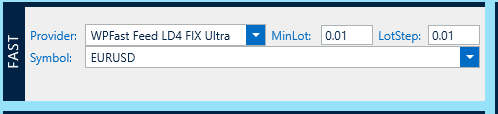
FAST – fast quotation provider;
SLOW1 is the first slow account/broker to trade; SLOW2- the second slow account/broker for trading;
Trading and placing of locking orders takes place between SLOW1 and SLOW2 accounts using quotes from a fast provider