Westernpips DocsWesternpips Docs
  • Home
  • FAQ
  • Documentation
  • Forums
  • Home
  • FAQ
  • Documentation
  • Forums
  • Crypto Trader
    • Crypto Scanner - 1 Leg
    • Crypto Scanner - 2 Leg
    • Crypto Table
  • Getting Started
    • Web Portal my.westernpips.com
      • Web Portal Password Recovery
      • How to Buy Westernpips Products?
    • Products Installation
    • Prerequisites
      • .NET Desktop Runtime Installation
      • ASP.NET Core Runtime Installation
      • Microsoft Redistributable Installation
    • System Requirements
    • Installation Troubleshooting
  • Westernpips Golden Tools 3.5.7
    • Downloading
    • First Run
    • Installing a Westernpips Products Using WGT
    • Working with Installed Products
    • WGT Update
  • Westernpips Private 7
    • How to Check Which Quote Feed Is Faster
    • Installing and First Run
    • License Activation and Login
    • Change License IP, Add new IP
    • User Interface
      • Main Window
      • Dashboard
        • Options
        • Strategies
        • Connections
        • Schedulers
    • Trades Discovery, Check Orders Duration
    • WESTERNPIPS PRIVATE 7 ALGOS
      • OneLeg
        • OneLeg: Before You Start
        • OneLeg First Setup, Step by Step
        • OneLeg Key Parameters with an XAUUSD Example
        • OneLeg Troubleshooting
      • Two Leg Simple Hedge
      • Two Leg Lock
      • Multi Leg Spread
      • One Leg Multi
      • OneLegHidden
      • Two Leg Standard
      • Remote
      • Copier
      • Clicker in WesternPips Private 7
      • Session Control — Quick Guide
      • Exucution Control — Quick Guide
      • Slippage Control - Fast Guide
      • Add/Edit Provider Window Settings
      • BackTester
      • Setting up a connection with the Broker Terminal via the EA connector
    • Connectors
      • Common Settings and Operation
        • FIX Connection Settings
        • FIX Logs
      • Trading and Fast Sources Connectors
        • 24Exchange Connector
        • Active Financial API Connector
        • Binance Connector
        • Bitfinex Connector
        • CBOE FIX Connector
        • Celer FIX Connector
        • CFH FIX Connector
        • CTrader FIX Connector
        • DukasCopy FIX Connector
        • DxFeed FIX Connector
        • Euronext FIX Connector
        • Exante FIX Connector
        • FastMatch ITCH Connector
        • FlexTrade FIX Connector
        • Fortex FIX Connector
        • FXCM FIX Connector
        • FxPig FIX Connector
        • GCEX FIX Connector
        • Gold-i Matrix FIX Connector
        • Integral FIX Connector
        • LMAX API Connector
        • LMAX FIX Connector
        • MaxxTrader FIX Connector
        • MT EA Connector
        • M4 Server Connector
        • M5 Server Connector
        • OGM FIX Connector
        • OKX Connector
        • OneZero FIX Connector
        • PrimeXM FIX Connector
        • Remote Connector
        • Rithmic Connector
        • RoE FIX Connector
        • Saxo FIX Connector
        • SolidFX FIX Connector
        • Spotex FIX Connector
        • TraderMade FIX Connector
        • Universal Connector
        • Universal Fast Connector
        • XenFin FIX Connector
        • XTRD FIX Connector
  • Westernpips Webcliker
    • System Requirements
    • Installer
    • Agent
    • UI Settings
    • UI Logs
    • Start/Stop
    • Connections
    • Trade platforms
      • CMC Markets
      • M5 Web
      • M4 Web
      • TRADE NATION
      • Exness Web
      • Universal cliker
      • IG Trading Platform
      • MEX / MultiBank
      • ByBit
      • EXANTE
      • IQ Option
      • Plus500
      • Quotex
    • Risk Warning
  • Glossary
    • Latency Arbitrage
    • Fast Price Feed
    • Execution Latency
    • Slippage
    • FIX API
    • Requote
    • Forex Arbitrage
    • Toxic Flow
    • Last Look
    • B-Book
    • Forex VPS
    • Brokers That Allow Arbitrage
    • Low Latency

How to Buy Westernpips Products?

354 views 3

How to Buy Westernpips Products?

First you shold register on Westernpips Web Portal

After you have registered on the site in your Personal Account on the Site, you can purchase any of the three Privat 7 packages.

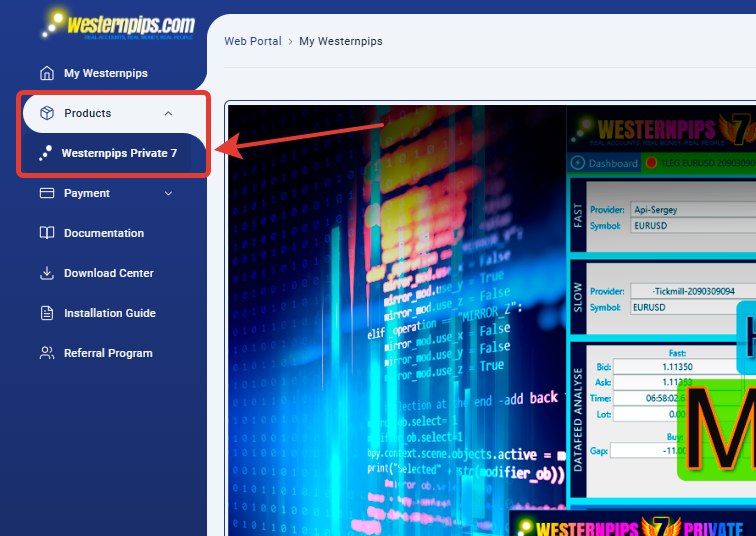
Step #1 In the upper-left corner of your personal account, select the «Products» section and then select «Westernpips Private 7»:
How to Buy Westernpips Products? - 2025 10 09 15 24 37

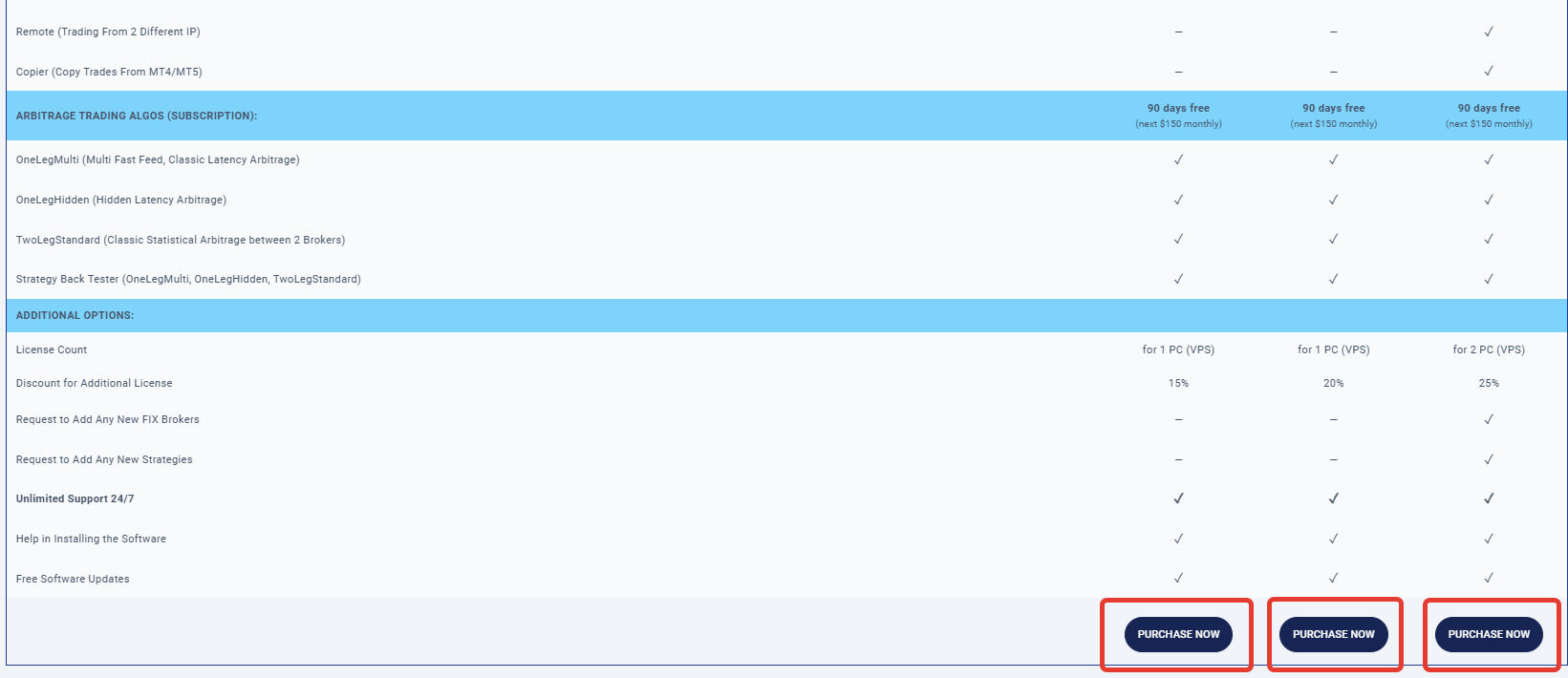
Step #2 You will see tariff plans with a detailed description of their composition. Check them out, choose a Private 7 package by going down the page:
How to Buy Westernpips Products? - 2025 10 09 15 37 18

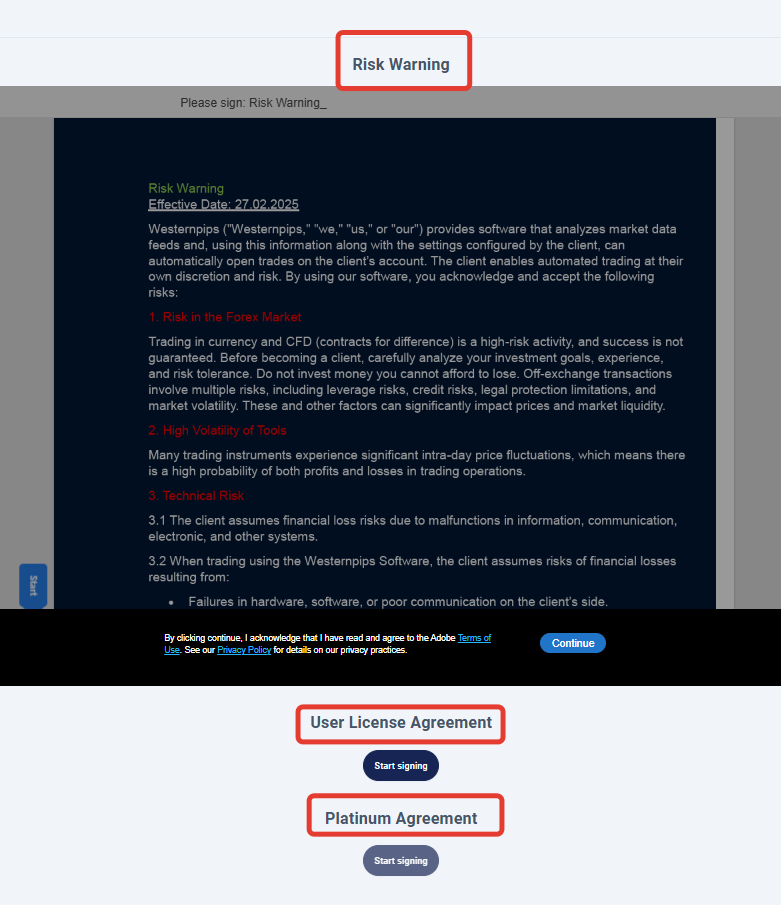
Step #3 Click on the Purchase Now area. You will have a section like this where you will need to review and sign 3 client agreements. Risk Warning, User License Agreement and Platinum (Silver or Gold) Agreement.
How to Buy Westernpips Products? - 2025 10 09 15 46 24

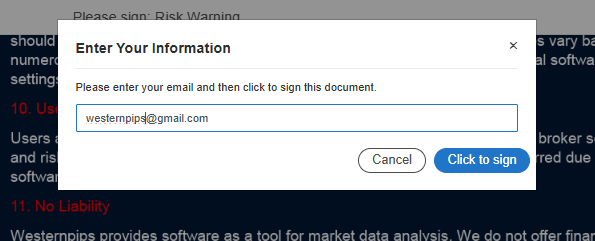
Step #4 Sign each document using hints. Enter only up-to-date information, namely Name, Email, amount and payment method. Enter your current and up-to-date email. You will receive confirmations and subsequent copies of the documents you have signed.
How to Buy Westernpips Products? - 2025 10 09 15 52 53

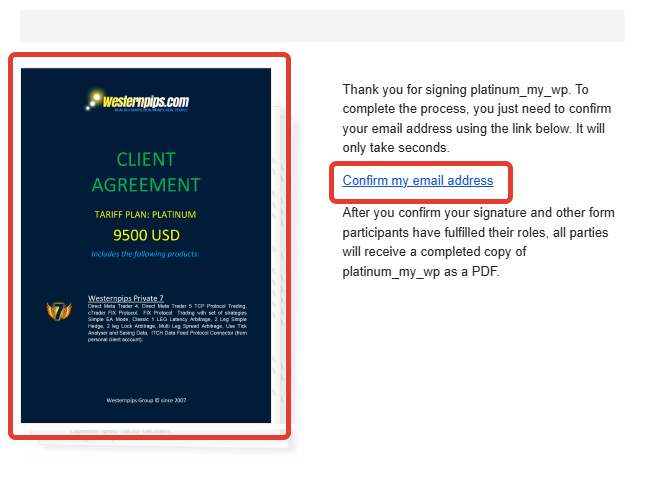
Step #5 You will receive an email with a link in it. You need to confirm by clicking on it. An example of one of the three emails:
How to Buy Westernpips Products? - 2025 10 09 15 58 36

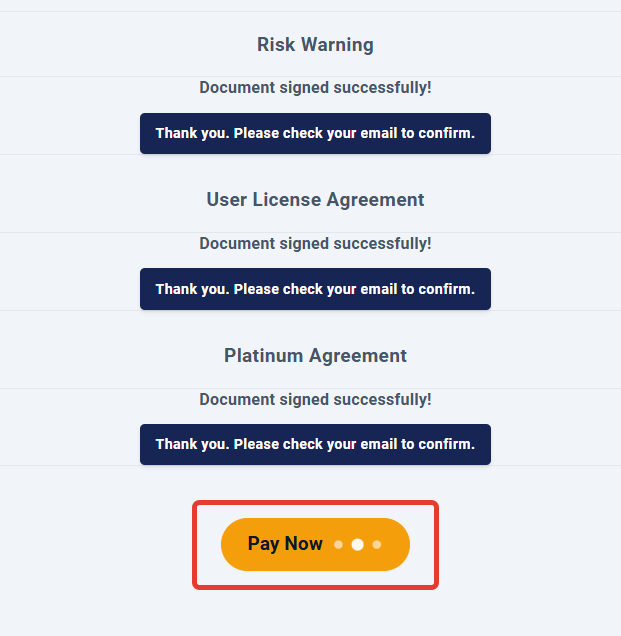
Step #6 After that, go back to your personal account and click «Pay Now»
How to Buy Westernpips Products? - 2025 10 09 16 06 57

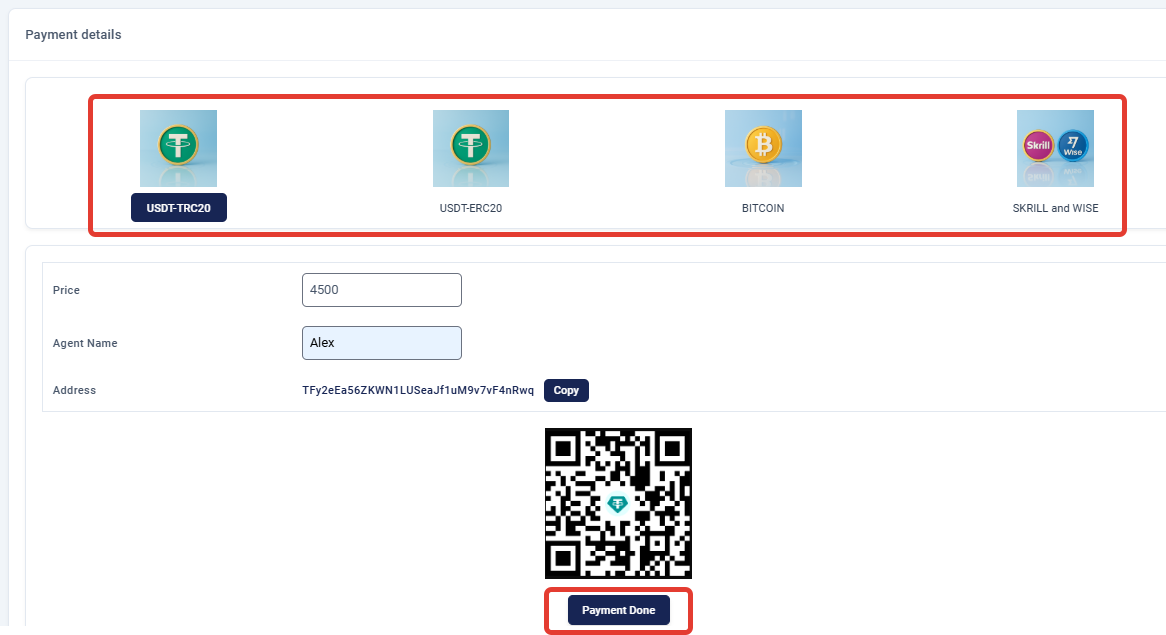
Step #7 You will see a payment section. Select the payment method, the cost, and the Agent’s name (if you came via a referral link, the section will not be active to fill in) and paying
How to Buy Westernpips Products? - 2025 10 09 16 14 14

Step #8 After the payment is made, click «Payment Done»

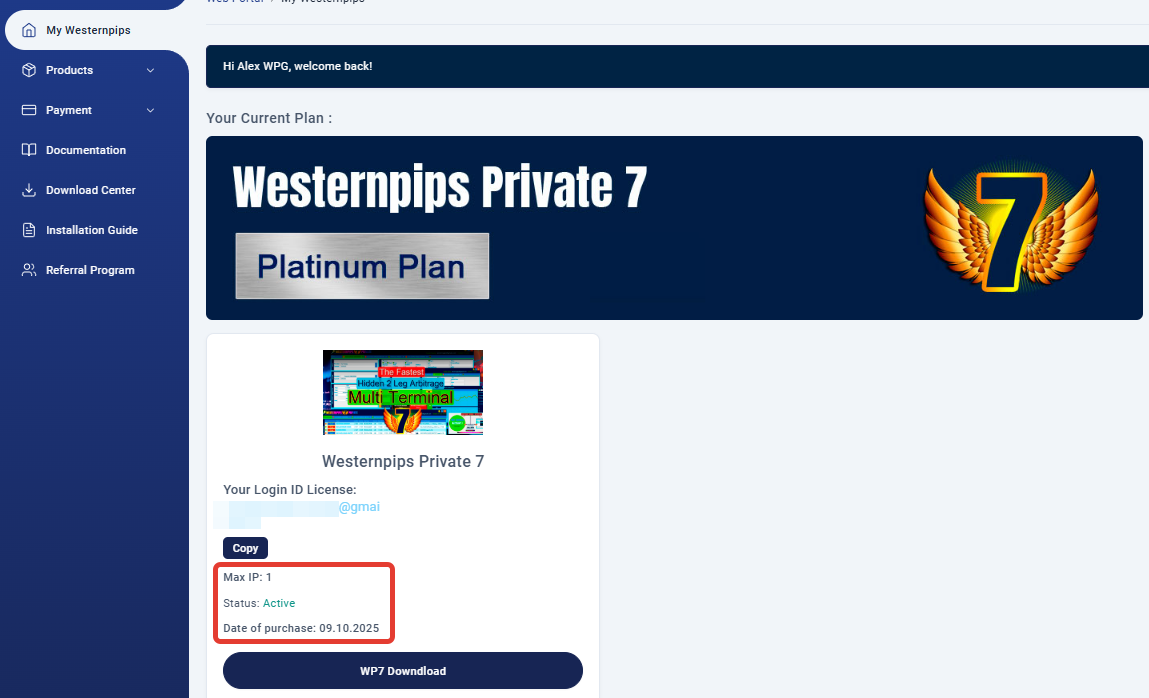
Step #9 Next, you need to contact your agent and he will verify your payment. After approval, you will see that you have an active license.
How to Buy Westernpips Products? - 2025 10 09 16 21 07

As a confirmation, you will receive an email and Telegram stating that you have purchased the Privat 7 package.

Was this helpful?

3 Yes  No
Related Articles
  • Low Latency
  • Brokers That Allow Arbitrage
  • Forex VPS
  • B-Book
  • Last Look
  • Toxic Flow
Previously
Web Portal Password Recovery
Up Next
Products Installation
  • Copyright 2026 Westernpips.com. All Rights Reserved.

LiveInternet counter