One Leg Multi is a latency arbitrage strategy in Westernpips Private 7 that watches one or several fast price feeds and trades on a single slow broker account when the broker’s price lags behind any of them. It can also use a separate signal account to measure the gap, records quotes for the BackTester and closes trades by take profit, stop loss, reverse gap or trailing stop. Below you will find how the strategy works, a quick start, a full reference of every setting in build 590.1 and how to read the log.
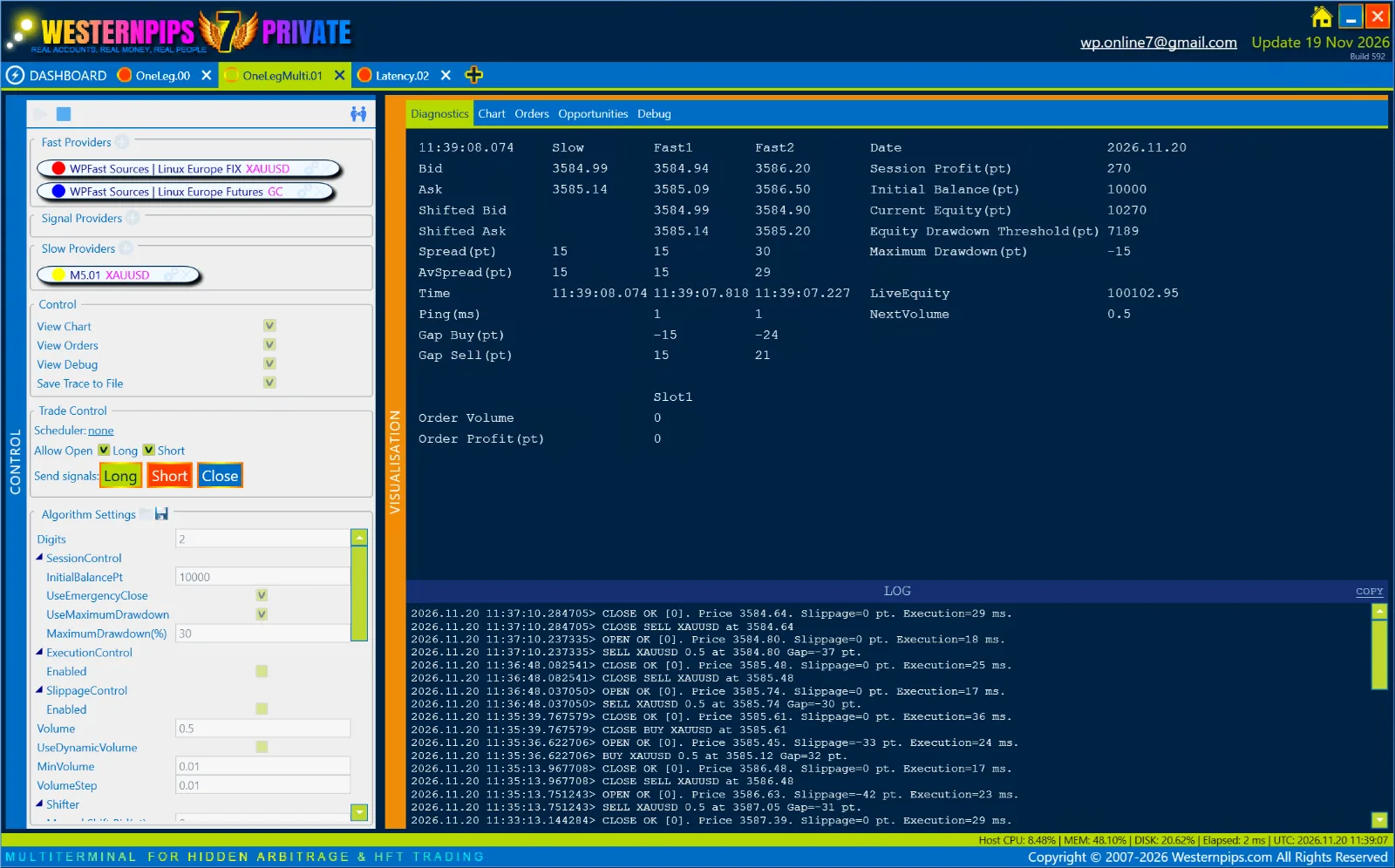
New to One Leg Multi? Start with these guides:
- First setup and BackTester, step by step: record quotes, choose the levels, measure execution, test the set and trade small.
- XAUUSD example: the set, one Sell trade step by step, two live sessions and a backtest of the same quotes.
- Troubleshooting: no trades, failed orders, Emergency closes, late stop losses and BackTester problems.
How the One Leg Multi strategy works
- Fast quotes: every connected fast provider (Westernpips Fast Source, FIX, API or any broker terminal) sends its own Bid and Ask. Each feed is processed separately.
- Price alignment: manual shift and, if enabled, AutoShift remove a constant price difference between each fast feed and the reference account.
- Gap calculation: for each fast feed the program calculates Gap Buy = fast Bid − reference Ask and Gap Sell = fast Ask − reference Bid, in points. The reference account is the Signal provider if you added one, otherwise the Slow broker.
- Entry: when a new tick from a fast feed makes Gap Buy ≥ Min Open Gap, a Buy is sent to the slow broker; when Gap Sell ≤ −Min Open Gap, a Sell is sent. Spread filters, direction permissions and the scheduler are checked first.
- Exit: the position is closed by take profit, stop loss, reverse gap (Close Gap), trailing stop, the manual Close button or a scheduler Close All action.
Because the gap is measured to the price you can actually trade at (Ask for a Buy, Bid for a Sell), the broker’s spread is already inside it: a wider spread automatically needs a larger move of the fast feed. Learn more in the glossary: latency arbitrage, fast price feed, slippage.
One Leg Multi compared with OneLeg
| Feature | One Leg Multi | OneLeg |
|---|---|---|
| Fast feeds | One or several; any of them can trigger a trade | One |
| Separate signal account | Yes (optional) | No |
| Gap threshold | Min Open Gap, spread already included in the formula | MinLevelOpen + slow spread + Commission |
| Exits | TP and SL from signal or from entry, Close Gap, trailing stop | Virtual TP/SL, reverse gap, trailing, breakeven, timer, Smart close |
| Equity protection | Session Control: drawdown in points and Emergency close | MaxDD in % of equity |
| Execution Control | Shown but not applied in build 590.1 | Applied |
| BackTester | Supported: Backtest OneLegMulti, one run at a time | Not supported |
Quick start: set up One Leg Multi in 6 steps
- Add the connections. Add the fast feed and the broker account in Dashboard > Connections.
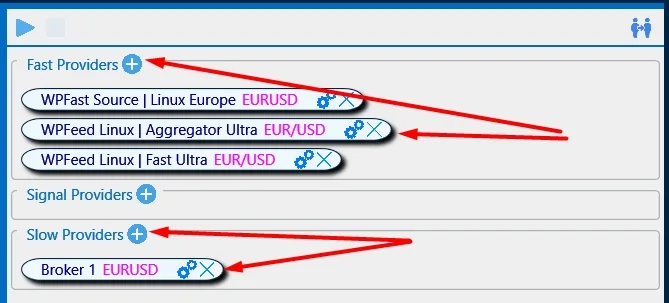
- Add providers to the tab. Press + next to Fast Providers (one or more), optionally Signal Providers, and Slow Providers (exactly one trading account). Enter the symbol exactly as each provider names it.
- Set Digits. Digits defines the point size for every setting: 5 for EURUSD, 3 for USDJPY, 2 for XAUUSD at 4062.22.
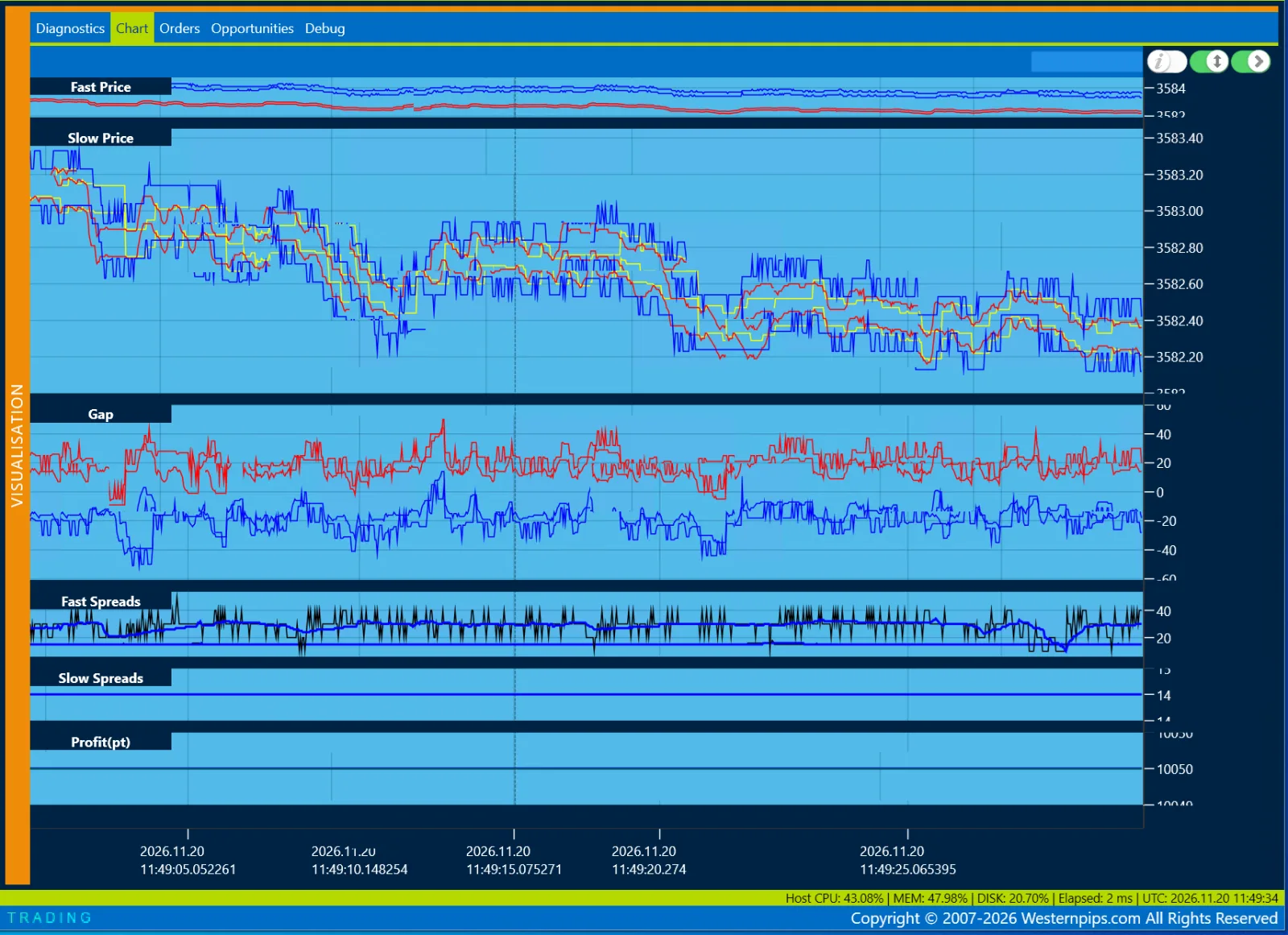
- Watch the Gap chart without trading. Untick Long and Short, tick View Chart and Save Trace to File and press Start. Note how high the gap peaks go at this broker.
- Set the levels. Choose Min Open Gap above the usual noise, then TakeProfit, StopLoss and the optional Close Gap or trailing stop. Check them in the BackTester on the recorded quotes: see first setup and BackTester.
- Trade small. Set Volume to the minimum, tick Long and/or Short and press Start. Review the first trades in the log and the Orders tab before raising the lot.
Fast, Signal and Slow providers
| Block | How many | Role |
|---|---|---|
| Fast Providers | 1 or more | Price reference. A gap is calculated for each feed; a tick from any of them can open a trade. Close Gap checks all of them. |
| Signal Providers | 0 or 1 | Optional account used only to calculate the gap and AutoShift. No orders are sent to it. |
| Slow Providers | Exactly 1 | The trading account. All orders are opened and closed here; TP, SL and trailing are checked against its Bid and Ask. |
Press + next to a block to open the Edit Provider window: choose the provider and symbol, and for the slow account the fill policy, open and close order type, slippage and commission. Every field is described in Edit Provider settings.
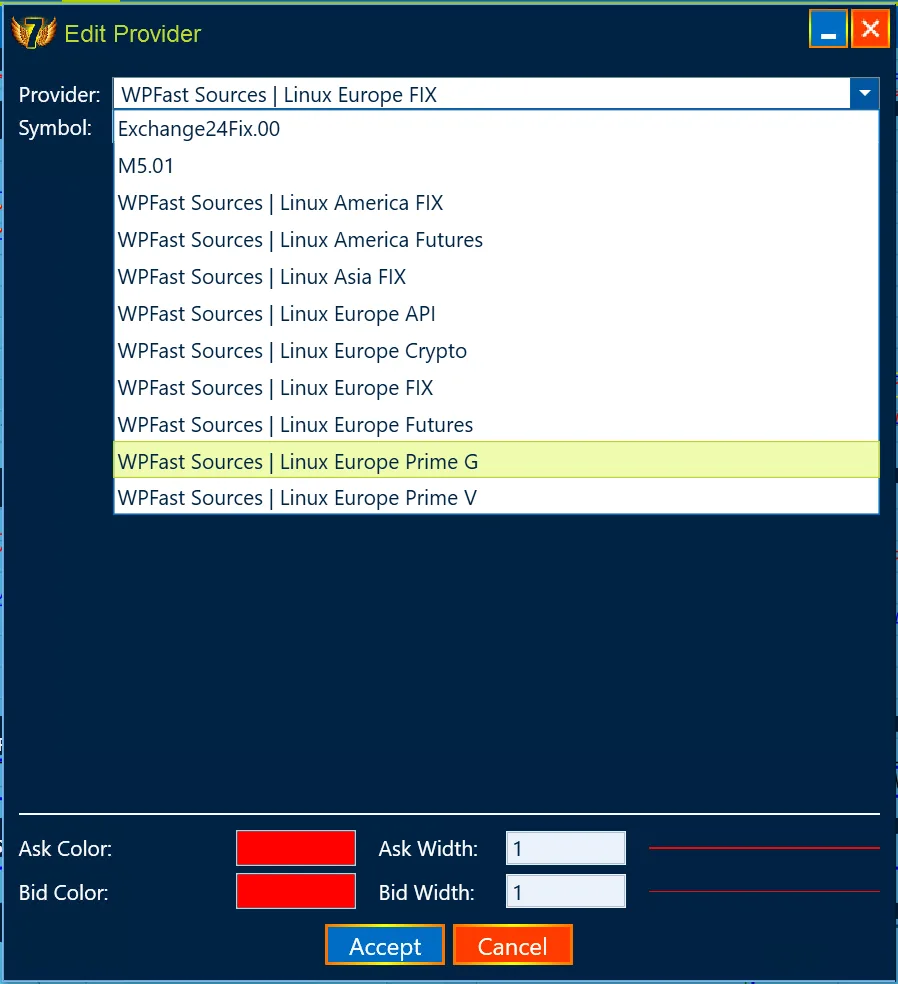
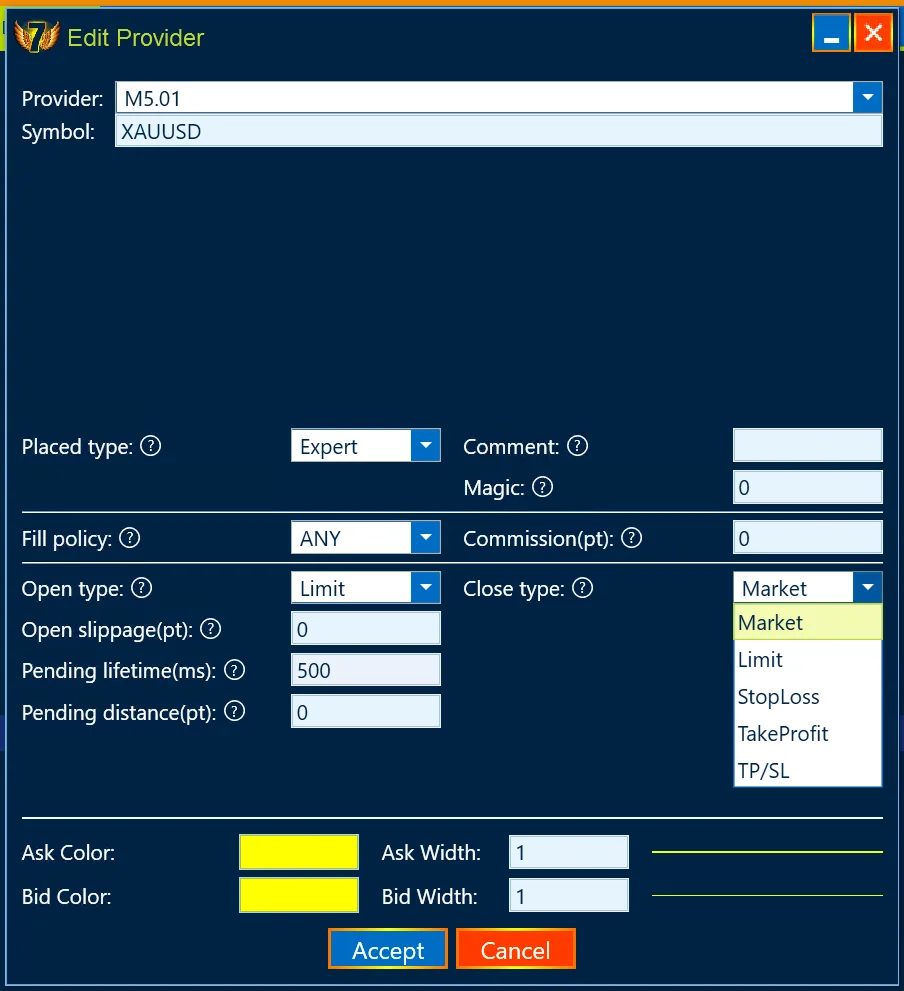
When to add a Signal provider. Use it when you want the gap measured on one account but executed on another, for example a second account of the same broker on a different server. If you leave the block empty, the gap is measured on the slow trading account itself. All providers must send quotes before the strategy can trade.
How the gap is calculated: an example
Illustrative numbers for XAUUSD with Digits 2 (1 point = 0.01) and no signal provider: the shifted fast Bid is 4062.80 and the broker Ask is 4062.49. Gap Buy = 4062.80 − 4062.49 = 0.31 = 31 points. With Min Open Gap 30 this tick opens a Buy at the broker’s Ask; with Min Open Gap 35 it does not.
Control and Trade Control panels
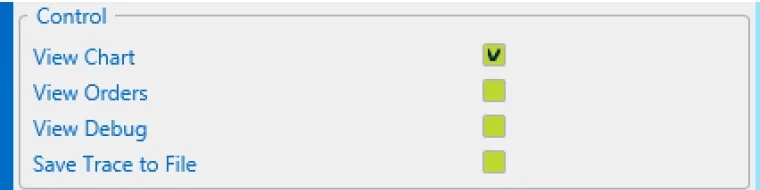
| Setting | What it does |
|---|---|
| View Chart | Shows the Chart tab: Fast Price, Slow Price and Gap with trade signals. |
| View Orders | Shows the Orders tab with every closed order: prices, slippage, execution time and profit. |
| View Debug | Shows the Debug tab: the full set of values the strategy saw on every tick, for in-depth analysis. |
| Save Trace to File | Records all quotes and diagnostics to C:\Program Files\Westernpips Private 7\.traces\OneLegMulti\<tab name> for the BackTester. See recording quotes. |
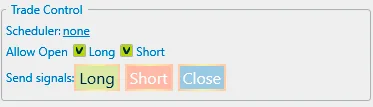
- Scheduler: link to a scheduler. When the scheduler forbids new positions, no new trades open; a Close All action closes the open position. “none” means no scheduler.
- Allow Open Long / Short: which new trades the strategy may open. With both unticked it shows quotes and the gap but does not trade; open positions are still managed and closed.
- Send signals (Long, Short, Close): open a position manually at once, regardless of the gap, or close the open position.
One Leg Multi settings reference
Settings are listed in the same order as in the Algorithm Settings panel of build 590.1. “pt” means points, defined by Digits. New settings apply after Stop and Start. Use the folder and disk icons in the panel header to load and save a set file.
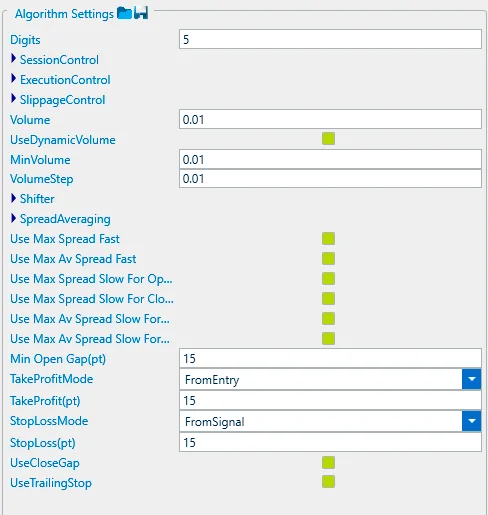
General and volume
| Parameter | What it does | Unit | Default |
|---|---|---|---|
| Digits | Number of decimals in the broker’s price. 1 point = 10−Digits. All “pt” settings and the gap depend on it. | digits | 5 |
| Volume | Fixed lot of each trade when UseDynamicVolume is off. | lots | 0.01 |
| UseDynamicVolume | Lot = slow account equity ÷ DynamicVolumeEquityDivider, rounded to the nearest VolumeStep and not less than MinVolume. | on/off | off |
| DynamicVolumeEquityDivider | Shown when UseDynamicVolume is on. Smaller value = larger lot. Example: equity 5,000 and divider 2,000 → 2.50 lots; equity 1,000 and divider 1,400 → 0.71 lots. | number | 1400 |
| MinVolume | Smallest lot the dynamic calculation may use. | lots | 0.01 |
| VolumeStep | Step for rounding the dynamic lot. | lots | 0.01 |
SessionControl: drawdown and emergency protection
| Parameter | What it does | Unit | Default |
|---|---|---|---|
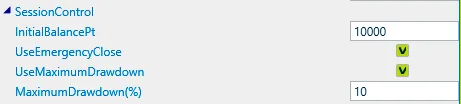
| InitialBalancePt | Starting session equity in points, not money. Session equity = InitialBalancePt + closed profit + floating profit of the strategy, all in points. | pt | 10000 |
| UseEmergencyClose | Every 5 seconds compares the orders the strategy tracks with the orders the broker shows on this symbol. If the numbers differ, the strategy switches to Emergency: it closes all orders on the symbol at market and opens nothing new. When no orders are left and 60 seconds have passed, trading resumes. | on/off | on |
| UseMaximumDrawdown | Turns on the drawdown limit. | on/off | on |
| MaximumDrawdown(%) | Stop level = highest session equity − MaximumDrawdown% of it. When session equity falls to this level, new entries stop until the tab is restarted; open positions are still closed by the exit rules. Example: InitialBalancePt 10000 and 10% → trading stops after a 1,000-point fall from the peak. | % | 10 |
Important: with UseEmergencyClose on, orders on the same symbol of the slow account that the strategy does not own are counted as a mismatch and closed. On MT4/MT5 accounts set Placed type Expert and a unique Magic in the slow provider’s Edit Provider window (build 592): the strategy then tracks only orders with that number. Without a Magic, do not trade the same symbol manually or with another strategy while One Leg Multi runs.
ExecutionControl and SlippageControl
Both blocks appear in the panel (Enabled, Threshold(ms) or SlippageControlPt, Max Executions Count Above Threshold, Max Consecutive Executions Count Above Threshold), but One Leg Multi does not use them in build 590.1: changing them has no effect on trading. To limit risk, use SessionControl, the spread filters and a broker with stable execution. The Execution Control and Slippage Control guides describe these modules for the strategies that apply them.
Shifter: price alignment between feeds
| Parameter | What it does | Unit | Default |
|---|---|---|---|
| Manual Shift Bid(pt) / Manual Shift Ask(pt) | Constant shift added to the Bid and Ask of every fast feed before any other calculation. | pt | 0 / 0 |
| Use Auto Shift | Adds the average difference between the reference account (Signal or Slow) and each fast feed over a window, so a constant offset between providers does not look like a gap. | on/off | off |
| PeriodType | Window type: Ticks, Time or Both. With Both the window keeps at least Period(ticks) ticks and at least Period(ms) of history. | list | Both |
| PriceMode | Median: one shift from the mid prices. BidAsk: separate shifts for Bid and Ask. | list | Median |
| Period(ticks) | Window length in ticks (Ticks or Both). | ticks | 100 |
| Period(ms) | Window length in milliseconds (Time or Both). | ms | 30000 |
| WaitingToBeFilled | No gap and no trades until the window is full. | on/off | off |
AutoShift follows slow changes of the offset, so a gap that lasts much longer than the window is gradually absorbed. Keep the window long compared with the gaps you want to trade.
SpreadAveraging and spread filters
| Parameter | What it does | Unit | Default |
|---|---|---|---|
| SpreadAveraging (PeriodType, Period(ticks), Period(ms), WaitingToBeFilled) | Window for the average spread of each provider, used by the “Av” filters. Same window logic as the Shifter. | — | Both, 10 ticks, 1000 ms, off |
| Use Max Spread Fast + Max Spread Fast(pt) | No entry while the current spread of the triggering fast feed is above the limit. | pt | off, 0 |
| Use Max Av Spread Fast + Max Av Spread Fast(pt) | Same for the average spread of the fast feed. | pt | off, 0 |
| Use Max Spread Slow For Open | No entry while the broker’s current spread is above Max Spread Slow(pt). | on/off | off |
| Use Max Spread Slow For Close | No exit while the broker’s current spread is above Max Spread Slow(pt). | on/off | off |
| Max Spread Slow(pt) | Limit for the two settings above. | pt | 0 |
| Use Max Av Spread Slow For Open / For Close + Max Av Spread Slow(pt) | Same as above for the broker’s average spread. | pt | off, 0 |
Important: the “For Close” filters postpone every exit, including the stop loss, while the spread is above the limit. During a news spike an open position can stay open longer than its StopLoss suggests.
Entry: Min Open Gap
| Parameter | What it does | Unit | Default |
|---|---|---|---|
| Min Open Gap(pt) | Main entry threshold. Buy when Gap Buy ≥ Min Open Gap on the fast feed that just ticked; Sell when Gap Sell ≤ −Min Open Gap. | pt | 15 |
Exits: take profit, stop loss, Close Gap and trailing
| Parameter | What it does | Unit | Default |
|---|---|---|---|
| TakeProfitMode | FromEntry: TP is counted from the actual fill price. FromSignal: from the broker’s price at the signal (Ask for Buy, Bid for Sell). | list | FromEntry |
| TakeProfit(pt) | Distance of the take profit. A Buy closes when the broker’s Bid reaches it, a Sell when the Ask reaches it. | pt | 15 |
| StopLossMode | FromSignal: SL is counted from the price at the signal. FromEntry: from the fill price. | list | FromSignal |
| StopLoss(pt) | Distance of the stop loss. A Buy closes when the broker’s Bid falls to it, a Sell when the Ask rises to it. | pt | 15 |
| UseCloseGap | Closes on a reverse gap: a Buy when Gap Sell ≤ −Min Close Gap on any fast feed, a Sell when Gap Buy ≥ Min Close Gap. | on/off | off |
| Min Close Gap(pt) | Size of the reverse gap. 0 closes as soon as any fast feed crosses the broker’s price in the opposite direction. | pt | 0 |
| CloseGapStartDelayMs | Close Gap starts working only this many milliseconds after the position opens. 0 = immediately. | ms | 0 |
| UseTrailingStop | Turns on the trailing stop. | on/off | off |
| TrailingStartPt | Profit in points at which trailing starts. | pt | 15 |
| TrailingStopPt | Distance of the stop from the current broker price (Bid for Buy, Ask for Sell). The stop only moves in your favour and replaces the StopLoss level when it is better. | pt | 15 |
Built-in rules (no settings)
- One position at a time: build 590.1 runs one slot (Slots Count = 1 is hidden in the panel). A new entry waits until the current position is closed.
- One entry per gap wave: after a Buy has been opened, the next Buy is allowed only when Gap Buy has dropped below 0 on every fast feed; the same applies to Sell. One long gap therefore gives one trade, not a series.
- Pause between entries: at least 1,000 ms after the previous signal (hidden setting).
- Entries only on fast ticks: the entry check runs when a fast feed sends a new price; exits are checked on every new tick of any provider.
- Quotes and feed check: nothing is traded until every provider has sent a quote. If the slow broker sends no new quote for 15 seconds, signals are ignored and the program resubscribes to the symbol.
How the exit settings work together: a worked example
Illustrative numbers for XAUUSD (Digits 2): a Buy signal comes at the broker’s Ask 4062.49, the order fills at 4062.62 (13 points of negative slippage), TakeProfit 30 and StopLoss 50.
| Level | FromSignal | FromEntry |
|---|---|---|
| Take profit | 4062.79: only 17 points above the fill | 4062.92: 30 points above the fill |
| Stop loss | 4061.99: 63 points below the fill | 4062.12: 50 points below the fill |
- FromSignal keeps the levels tied to the price at which the gap was measured, so slippage shortens the take profit and widens the stop.
- FromEntry keeps the full distances from the real fill.
- Close Gap exits when the fast feeds turn against the position, often before TP or SL; use CloseGapStartDelayMs to give the trade time after the fill.
- Trailing locks in profit once TrailingStartPt is reached; with TrailingStopPt smaller than TrailingStartPt the stop moves above the entry price.
How to read the One Leg Multi log
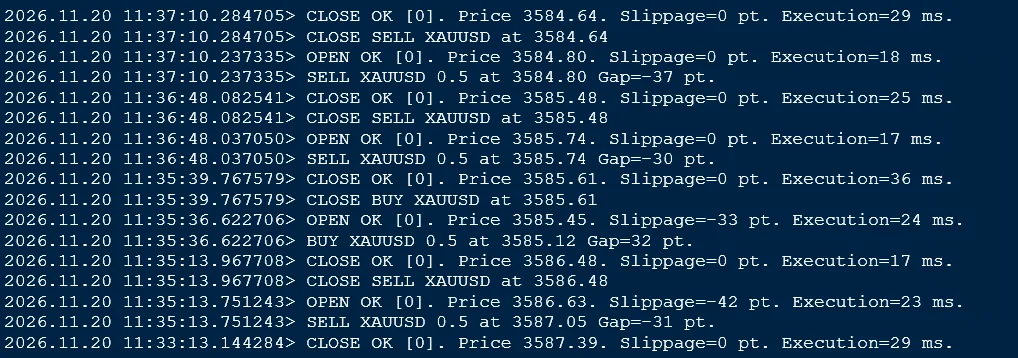
The log at the bottom of the tab records every step. Time stamps are UTC time of your computer. The number in brackets is the slot (always [0] in build 590.1).
| Line | What it means |
|---|---|
OneLegMulti.01 logging in... / logged in. |
The tab is connecting to all providers / all providers are connected. |
BUY XAUUSD 0.01 at 4062.49 Gap=31 pt. |
Entry signal: side, symbol, lot, broker price at the signal and the gap of the fast feed that triggered it. |
OPEN OK [0]. Price 4062.62. Slippage=-13 pt. Execution=11 ms. |
The broker filled the order. Negative slippage = worse than requested. |
OPEN FAILED [0]. Error=... |
The broker or connector rejected the order: wrong symbol, unsupported fill policy, lot, margin, trading disabled. |
CLOSE BUY XAUUSD at 4062.92 |
An exit rule triggered (TP, SL, Close Gap, trailing, manual or scheduler). |
CLOSE OK [0]. Price ... Slippage=... pt. Execution=... ms. |
The position is closed; the order appears in the Orders tab. |
CLOSE FAILED [0]. Error=... |
The close was rejected; the strategy tries again on the next tick while the exit rule is true. |
Drawdown reached |
SessionControl stopped new entries. |
Emergency |
Order mismatch: all orders on the symbol are being closed. |
Strategy initialization error. |
The strategy could not be loaded from the Westernpips server; if followed by “Please update the software to latest version.”, update Private 7. |
Orders and Debug tabs
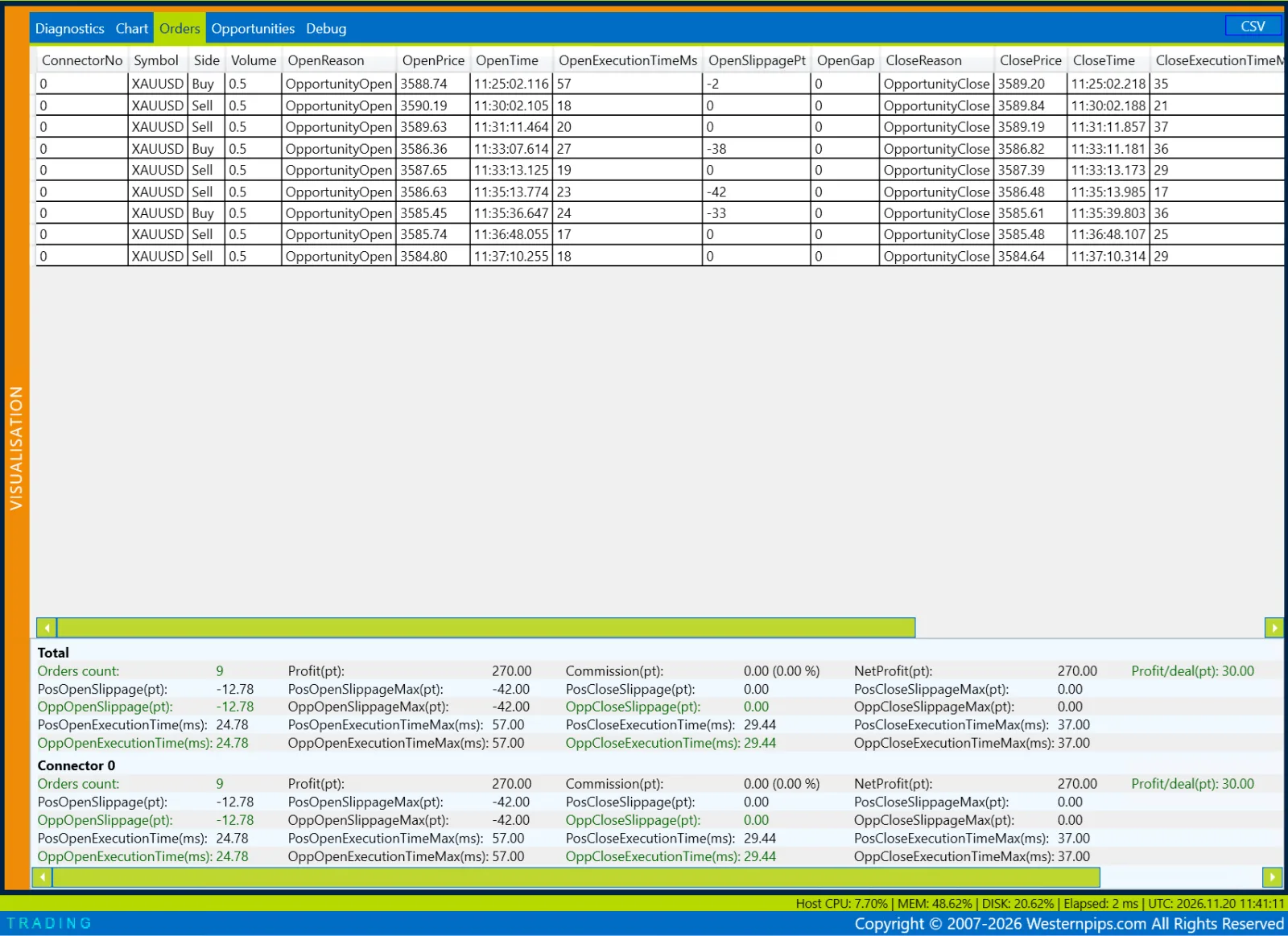
The Orders tab (View Orders) lists every closed order: open and close price and time, execution time in ms, slippage in points and the gap. Below the list, Total and Connector 0 show Orders count, Profit(pt), NetProfit(pt), Profit/deal(pt) and the average and maximum open and close slippage and execution time. The CSV button exports the list.
The Debug tab (View Debug) shows every tick the strategy processed: which provider sent it (ConnectorNo 0 = slow, 1, 2, … = fast feeds), QueueSize and TicksDelayMs, the broker’s Bid, Ask and spread, and each fast feed’s Bid, Ask, shifted Bid and Ask and spread. Use it to see exactly what the strategy saw before a signal. It can also be exported to CSV.
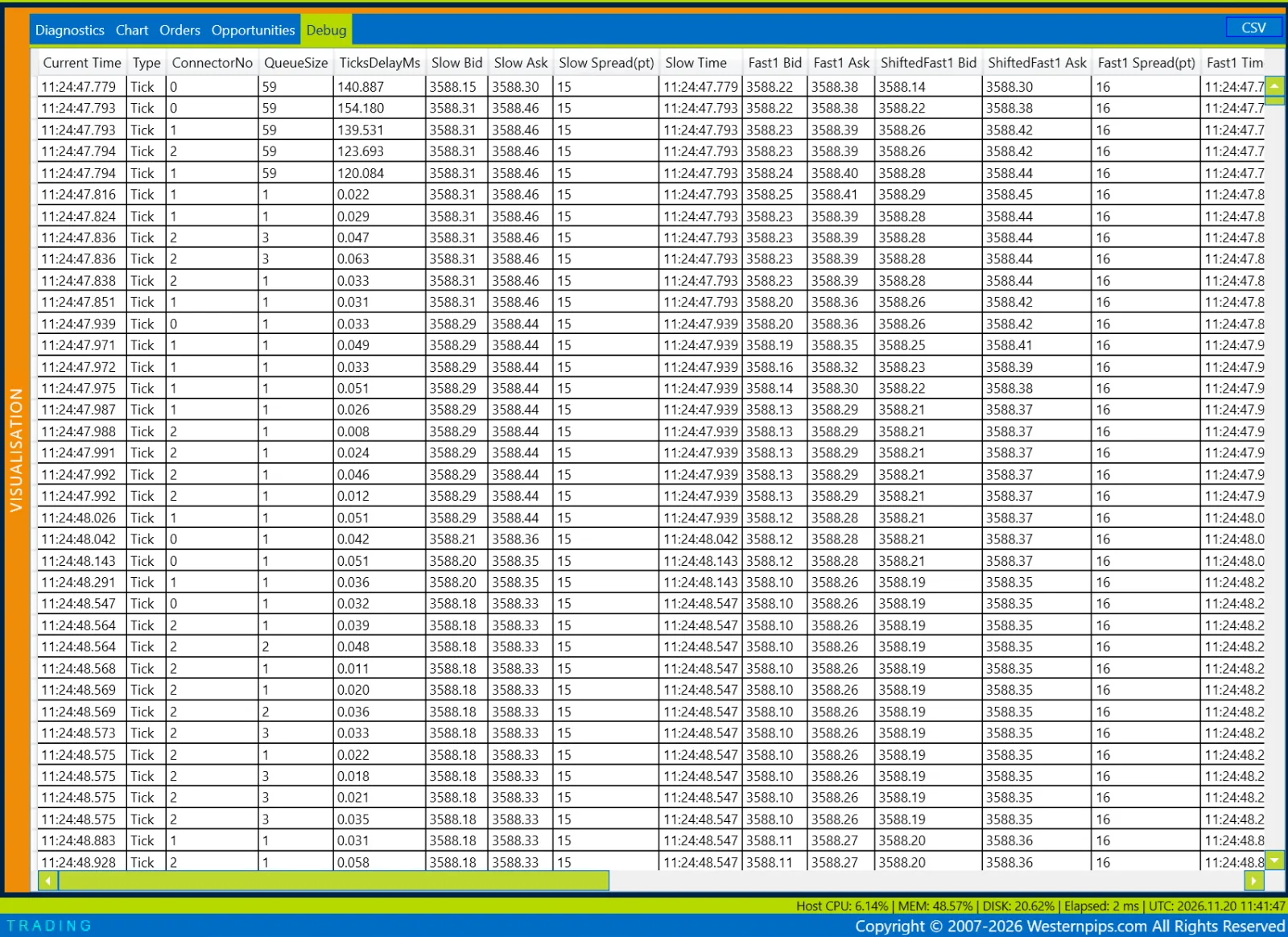
A real trade with its log lines is explained in the XAUUSD example. The example values in the table are illustrative. In the Debug tab and on the chart you also see, per fast feed, Gap Buy(pt), Gap Sell(pt), Spread(pt), AvSpread(pt), Shifted Bid / Ask and Ping(ms), and for the session TicksDelay(ms), Order Profit(pt), Session Profit(pt), Current Equity(pt), Maximum Drawdown(pt) and Equity Drawdown Threshold(pt).
Recording quotes and testing in the BackTester
With Save Trace to File on, every start of the tab creates a set of files in C:\Program Files\Westernpips Private 7\.traces\OneLegMulti\<tab name>, named by the UTC start time:
yyyyMMddTHHmmss.xml: the tab settings at start.yyyyMMddTHHmmss.trace: diagnostics of every tick, for replay.yyyyMMddTHHmmss_N____provider____symbol.v1.ticks: one quote file per provider (0 = slow, 1, 2, … = fast feeds, 10 = signal).
Testing a set: press + in the strategy tab bar and choose Backtest OneLegMulti. In the backtest tab select the .ticks file of each provider in the Ticks Path field of Edit Provider, enter your broker’s real execution time and slippage for the slow provider and press Start: the recorded quotes are replayed with your settings. Parameter optimization (MultiBacktest) is not available for One Leg Multi in build 590.1, so test variants one at a time. The full procedure is in One Leg Multi first setup and BackTester.
Replaying a session: the Analyzer item in the + menu opens a .trace file and shows exactly what the strategy saw at that time.
Record several full sessions, tune the set on one day and check it on other days before trading live. A backtest does not show how the broker reacts to your orders, so confirm the result with the minimum lot.
Common problems and solutions
| Symptom | Likely cause | What to do |
|---|---|---|
| No trades at all | Long/Short not allowed, scheduler blocks opening, gap below Min Open Gap, spread filter, Drawdown reached, a provider sends no quotes. | Check Allow Open and the scheduler, compare the Gap chart with Min Open Gap, set spread filters off for a test, check the log for “Drawdown reached”. |
| Only one trade on a long gap | Built-in rule: one entry per gap wave. | Expected behaviour. The next trade comes after the gap returns below 0 on every fast feed. |
| OPEN FAILED | Wrong symbol name, fill policy not supported by the broker, lot below minimum or not a multiple of the lot step. | Read the error text, check the symbol and Fill Policy in Edit Provider and the lot settings. |
| Positions closed unexpectedly, “Emergency” | Orders on the same symbol opened manually or by another strategy, or an order closed directly at the broker. | Set a unique Magic in the slow provider (Edit Provider, MT4/MT5) or keep the symbol for this tab only; turn off UseEmergencyClose only if you understand the risk. |
| Stop loss triggered late | A “For Close” spread filter postponed the exit during a spread spike. | Turn off Use Max Spread Slow For Close and Use Max Av Spread Slow For Close, or raise the limits. |
| Take profit hit with little profit | TakeProfitMode FromSignal with large entry slippage. | Switch to FromEntry or raise TakeProfit and Min Open Gap. |
| Execution Control settings do nothing | Not applied by One Leg Multi in build 590.1. | Use SessionControl and spread filters instead. |
Related guides
- One Leg Multi first setup and BackTester, XAUUSD example and troubleshooting.
- OneLeg and OneLegHidden: other one-leg strategies in Private 7.
- BackTester: testing sets on recorded quotes.
- Edit Provider settings and Session Control.
- Glossary: brokers that allow arbitrage, forex VPS, last look.
FAQ about the One Leg Multi strategy
How is One Leg Multi different from OneLeg?
One Leg Multi can take signals from several fast feeds and from a separate signal account, has TP and SL modes, Close Gap and trailing, and works in the BackTester. OneLeg uses one fast feed and has its own exit rules and Execution Control.
Which Min Open Gap should I use?
There is no universal value: it depends on the broker, symbol and feeds. Watch the Gap chart without trading, set the level above the usual noise and check it on recorded quotes in the BackTester. The broker’s spread is already included in the gap, so do not add it again.
Can One Leg Multi hold several positions at once?
Not in build 590.1: the slot count is fixed at 1, so the strategy holds one position at a time.
Can I optimize One Leg Multi settings automatically?
Not in build 590.1. Backtest OneLegMulti replays recorded quotes with one set at a time; the MultiBacktest optimizer is available only for other strategies.
Do I need a Signal provider?
No. Without it the gap is measured on the slow trading account. Add it only when you want to measure the gap on a different account from the one that trades.
Risk warning. Trading Forex, CFDs and cryptocurrencies with leverage carries a high risk of losing money. Results depend on the broker, its execution and rules, latency and settings; no profit is guaranteed. Default values and examples on this page illustrate how the settings work and are not recommendations. Test on a demo account first. Read the full risk warning.