A fast provider is a very fast price feed that shows where the price is going a moment before your broker does. The strategy only reads its prices and never trades on it, so its Edit Provider window is simple: choose the feed, choose the symbol, press Accept. A signal provider works the same way; it is an optional extra account used by some strategies to measure the price difference.
Edit Provider guides: Overview · Fast and Signal providers · Slow trading account · Backtest provider
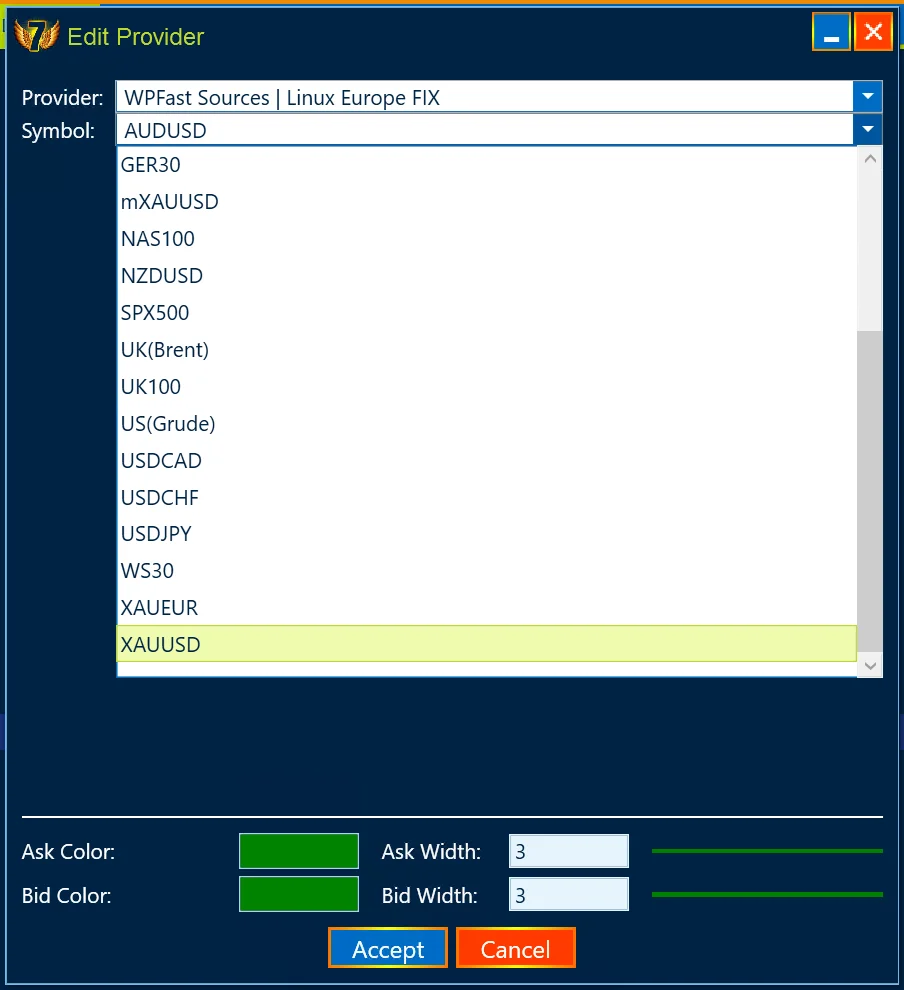
Quick setup in 4 steps
- Press + next to Fast Providers (or Signal Providers) in the strategy tab.
- Provider: choose the feed. For Westernpips feeds pick the region closest to your VPS, for example Europe for a VPS in London or Frankfurt.
- Symbol: pick the instrument from the list, or type it if there is no list.
- Press Accept. To change the provider later, press its gear icon; the cross icon removes it.
Fast, signal and slow: who does what
| Provider | In simple words | Trades on it? |
|---|---|---|
| Fast | The quickest price source. The strategy watches it to see the move first. | No |
| Signal | Optional. A second account on which some strategies measure the price difference instead of the trading account. | No |
| Slow | Your broker account where trades are opened. See slow trading account settings. | Yes |
Provider: which feed to choose
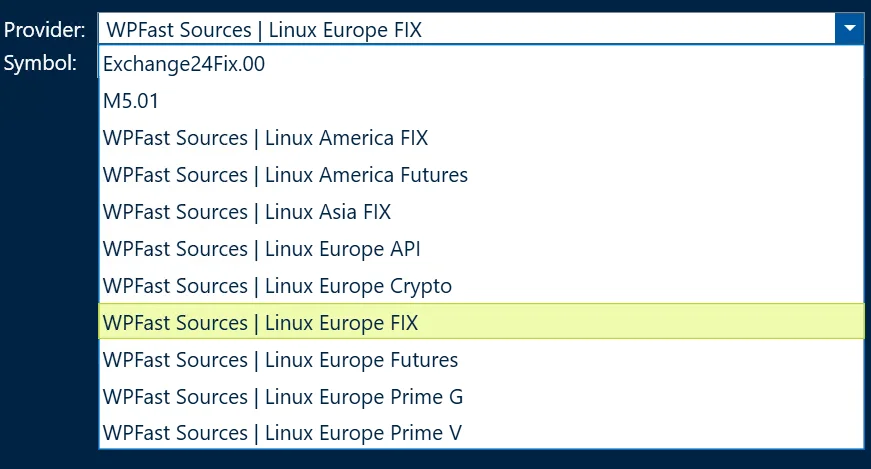
- WPFast Sources: Westernpips feeds, grouped by region (America, Europe, Asia) and type (FIX, Futures, API, Crypto, Prime). Different types quote different instruments: for example gold futures (GC) are in Futures.
- Your own feeds: any FIX or API feed you added yourself.
- Broker accounts: can also be used as a price source, usually as a signal provider.
Not in the list? Add the connection first in Dashboard → Connections, then open the window again.
Symbol: pick from the list or type the exact name
- Westernpips feeds: choose from the dropdown, as in the screenshot above.
- Broker accounts and other feeds: type the name exactly as that provider writes it (XAUUSD, XAU/USD, XAUUSD.e…).
- The fast symbol may differ from the broker’s: for example GC gold futures as the fast price for XAUUSD at the broker. The strategy’s AutoShift setting removes the constant difference between them; see the XAUUSD example.
Colors on the chart
Bid Color, Ask Color, Bid Width and Ask Width only change how this feed’s lines look on the Chart tab. Each new fast provider gets its own color (red, blue, green, black, pink), so you can tell them apart. Click a color box to change it.
How many providers you can add
| Strategy | Fast providers | Signal providers |
|---|---|---|
| One Leg Multi | up to 5 | up to 1 |
| OneLegHidden | 1 | up to 2 |
If you try to add more, the program shows “Maximum count of … providers is …”.
Common problems
| What you see | Why | What to do |
|---|---|---|
| The feed is not in the list | The connection was not added. | Add it in Dashboard → Connections. |
| The symbol is not in the list | This feed does not quote it. | Try another feed type, for example Futures for GC. |
| No prices after Start, the strategy does not trade | Wrong symbol name, or the connection is offline. | Check the name and the connection status. The strategy waits until every provider sends prices. |
Related guides
- Edit Provider: slow trading account settings
- Edit Provider: backtest provider settings
- Dashboard: Connections
- Fast price feed
Risk warning. Trading Forex, CFDs and cryptocurrencies with leverage carries a high risk of losing money. Order types, fill policies and backtest results behave differently between brokers and connectors; test every setting on a demo account first. Read the full risk warning.